Published

All published posts

2604 posts latest post 2026-08-19 simple view
Publishing rhythm
Aug 2026 | 30 posts

I have no experience in django, and in my exploration to become a better python developer I am dipping my toe into one of the most polished and widely used web frameworks Django to so that I can better understand it and become a better python developer.

If you found this at all helpful make sure you check out the django tutorial

“An atronaut working in a lab, there is a long snake working along side, shallow depth of field beakers, test tubes, volumetric lighting, pink lighting, by victo ngai, killian eng vibrant colours, dynamic lighting, digital art” -s50 -W768 -H448 -C7.5 -Ak_lms -S2250540408

install django #

The first thing I need to do is render out a template to start the project. For this I need the django-admin cli. To get this I am going the route of pipx it will be installed globally on my system in it’s own virtual environment that I don’t have to manage. This will be useful only for using startproject as far as I know.

pipx install django
django-admin startproject try_django
cd try_django
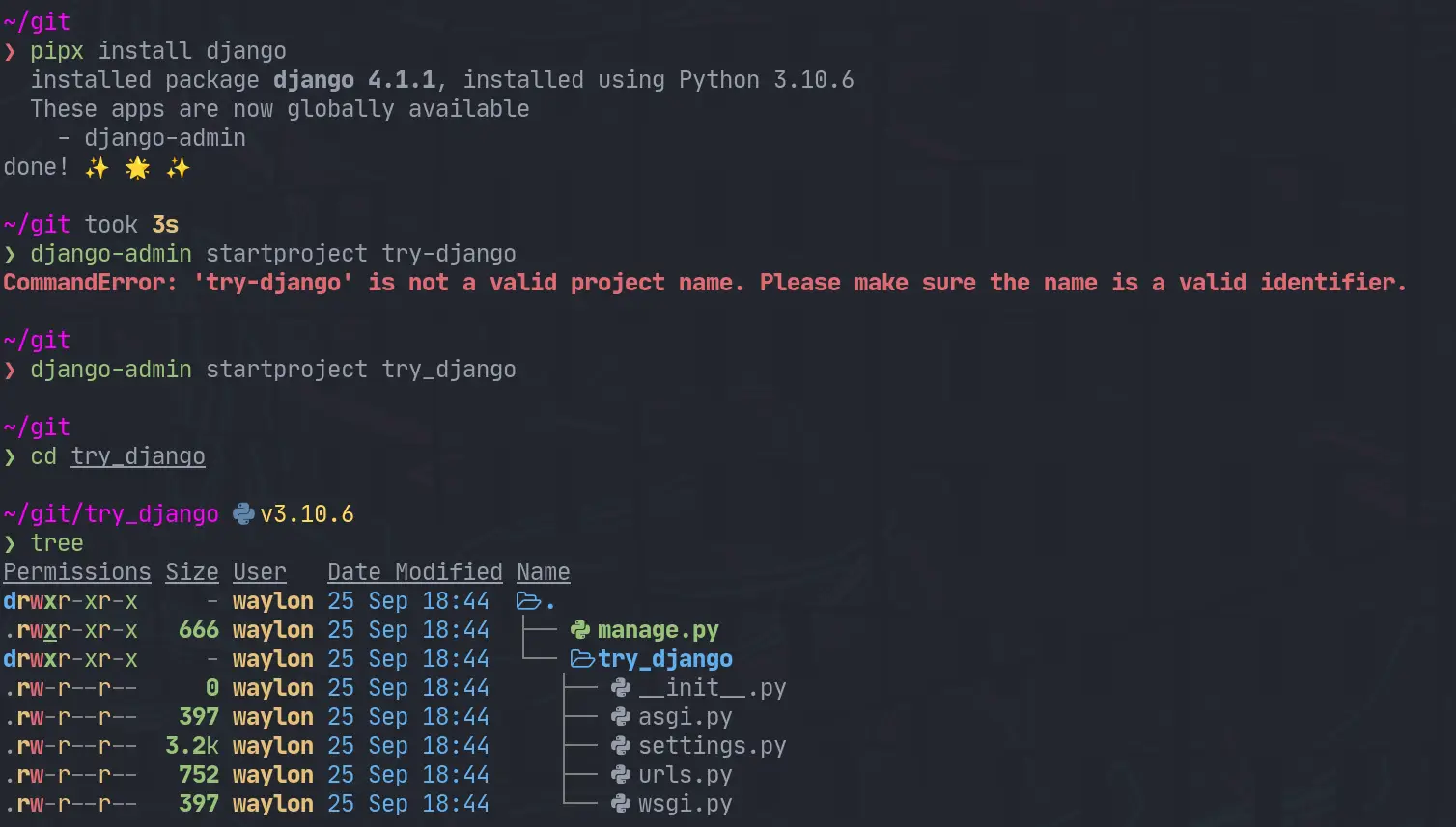
django-startproject.webp

Make a venv #

Once I have the project I need a venv for all of django and all of my dependencies I might need for the project. I have really been diggin hatch lately, and it has a one line “make a virtual environment and manage it for me” command.

hatch shell
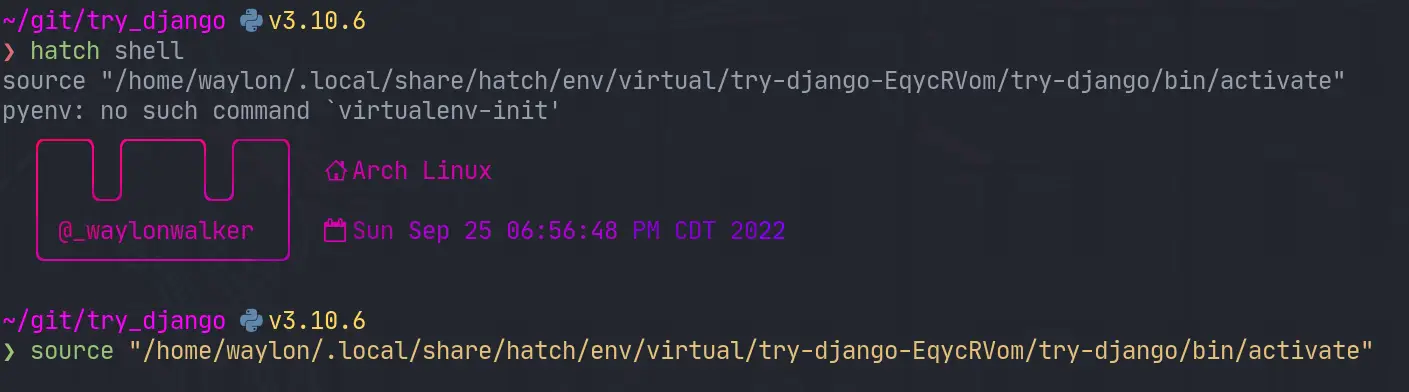
trydjango-venv.webp

If hatch is a bit bleeding edge for you, or it has died out by the time you read this. The ol trusty venv will likely stand the test of time, this is what I would use for that.

python -m .venv --prmpt `basename $PWD`
. ./.venv/bin/activate

Start the webserver #

Next up we need to start the webserver to start seeing that development content. The first thing I did was run it as stated in the tutorial and find it clashed with a currently running web server port.

python manage.py runserver
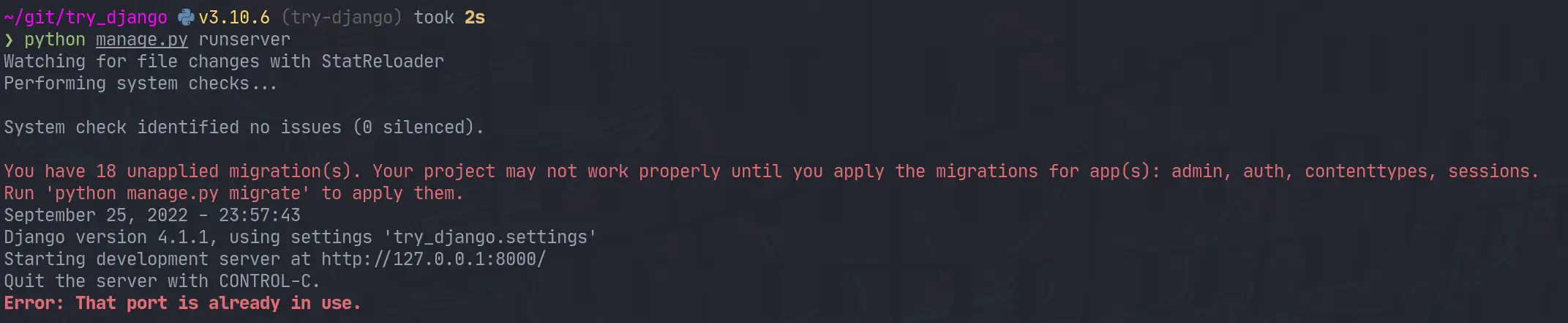
django-runserver-oops.webp

I jumped over to that tmux session, killed the process and I was up and running.

trydjango-runserver.webp

What’s running #

The default django hello world looks well designed. You are first presented with this page.

trydjango-hello.webp

Next #

I opened up the urls.py to discover that the only configured url was at /admin. I tried to log in as admin, but was unable to as I have not yet created a superuser. Next time I play with django that is what I will explore.

An astronaut working in a dimly lit labratory, it is almost black, heavy dark blacks, black space, heavy vingette, hacking on a computer terminal, htop is running, shallow depth of field beakers, test tubes, by Alphonse Mucha, dynamic lighting, digital art

While updating my site to use Markata’s new configurable head I ran into some escaping issues. Things like single quotes would cause jinja to fail as it was closing quotes that it shouldnt have.

Nuclear core being help up by glowing neon wires, cyberpunk synthwave, intricate abstract. delicate artwork. by tooth wu, wlop, beeple, dan mumford. pink volumetric lighting, octane render, trending on artstation, greg rutkowski very coherent symmetrical artwork. cinematic, hyper realism, high detail, octane render, 8k, depth of field, bokeh. chrome accents.

Jinja Escaping Strings #

Jinja comes with a handy utility for escaping strings. I definitly tried to over-complicate this before realizing. You can just pipe your variables into e to escape them. This has worked pretty flawless at solving some jinja issues for me.

<p>
{{ title|e }}
</p>

Creating meta tags in Markata #

The issue I ran into was when trying to setup meta tags with the new configurable head, some of my titles have single quotes in them. This is what I put in my markata.toml to create some meta tags.

[[markata.head.meta]]
name = "og:title"
content = "{{ title }}"

Using my article titles like this ended up causing this syntax error when not escaped.

SyntaxError: invalid syntax. Perhaps you forgot a comma?
Exception ignored in: <function Forward.__del__ at 0x7fa9807192d0>
Traceback (most recent call last):
    ...
TypeError: 'NoneType' object is not callable

jinja2 escape #

After making a complicated system of using html.escape I realized that jinja included escaping out of the box so I updated my markata.toml to include the escaping, and it all just worked!.

[[markata.head.meta]]
name = "og:title"
content = "{{ title|e }}"
Nuclear core being help up by wires, intricate abstract. delicate artwork. by tooth wu, wlop, beeple, dan mumford. pink volumetric lighting, octane render, trending on artstation, greg rutkowski very coherent symmetrical artwork. cinematic, hyper realism, high detail, octane render, 8k, depth of field, bokeh. chrome accents.
Check out gradio-app and their project gradio. Build and share delightful machine learning apps, all in Python. 🌟 Star to support our work!

When I am developing python code I often have a repl open alongside of it running snippets ofcode as I go. Ipython is my repl of choice, and I hace tricked it out the best I can and I really like it. The problem I recently discovered is that I have way overcomplicated it.

image

What Have I done?? #

So in the past the way I have setup a few extensions for myself is to add something like this to my ~/.ipython/profile_default/startup directory. It sets up some things like rich highlighting or in this example automatic imports. I even went as far as installing some of these in the case I didn’t have them installed.

import subprocess

from IPython import get_ipython
from IPython.core.error import UsageError

ipython = get_ipython()

try:
    ipython.run_line_magic("load_ext pyflyby", "inline")
except UsageError:
    print("installing pyflyby")
    subprocess.Popen(
        ["pip", "install", "pyflyby"],
        stdout=subprocess.DEVNULL,
        stderr=subprocess.DEVNULL,
    ).wait()
    ipython.run_line_magic("load_ext pyflyby", "inline")
    print("installing isort")
    subprocess.Popen(
        ["pip", "install", "isort"],
        stdout=subprocess.DEVNULL,
        stderr=subprocess.DEVNULL,
    )
A man looking over to a glowing nuclear core with hundreds of wires running from it

What I missed? #

I missed the fact that some of these tools like pyflyby and rich already have an ipython extension maintained by the library that just works. It’s less complicated and more robust to future changes in the library. If anything ever changes with these I will not have to worry about which version is installed, the extension will just take care of itself.

How to activate these. #

The reccomended way is to add them to your ~/.ipython/profile_default/ipython_config.py

c.InteractiveShellApp.extensions.append('rich')
c.InteractiveShellApp.extensions.append('markata')
c.InteractiveShellApp.extensions.append('pyflyby')

The issue that I found with this is that you can end up with a sea of errors flooding your terminal. Personally I will know immediately if ipython is working right or not and typically have scriped venv installs so I have everything I need, so If I don’t have everything it’s probably for a reason and I don’t need an error message lighting up.

My way around this was to test if the module was importable and if it had a load_ipython_extension attribute before appending it as an extension.

def activate_extension(extension):
    try:
        mod = importlib.import_module(extension)
        getattr(mod, "load_ipython_extension")
        c.InteractiveShellApp.extensions.append(extension)
    except ModuleNotFoundError:
        "extension is not installed"
    except AttributeError:
        "extension does not have a 'load_ipython_extension' function"


extensions = ["rich", "markata", "pyflyby"]
for extension in extensions:
    activate_extension(extension)

My Change #

If you want to see what I did to my config see this commit.

kedro-plugins by kedro-org is a game-changer in its space. Excited to see how it evolves. First-party plugins maintained by the Kedro team.
If you’re into interesting projects, don’t miss out on knossos, created by modrinth. [Archived] Former repo of the Modrinth frontend
Just starred markata-todoui by WaylonWalker. It’s an exciting project with a lot to offer. A todo plugin for markata. It is a tui (text user interface) that runs in the terminal using textual. It gives me a trello-board feel from the terminal. I can create, update, delete, move, and fully manage my todo items from the terminal with it.
Check out giscus and their project giscus. A comment system powered by GitHub Discussions.:octocat: 💬 💎

Astronauts stunting some stylish color explosion

A long needed feature of markata has been the ability to really configure out templates with configuration rather. It’s been long that you needed that if you really want to change the style, meta tags, or anything in the head you needed to write a plugin or eject out of the template and use your own.

Adding some Head #

Now you can add some extra style to your site with the existing built-in template.

[[markata.head]]
text = """
<style>
img {
  width: 100%;
  height: auto;
}
ul {
  display: flex;
  flex-wrap: wrap;
}
</style>
"""

You can have more than one Head #

Each text entry in markata.head just gets appended raw into the head.

[[markata.head]]
text = """
<style>
img {
  width: 100%;
  height: auto;
}
ul {
  display: flex;
  flex-wrap: wrap;
}
</style>
"""

[[markata.head]]
text = """
<script>
console.log('hey there')
</script
"""

Still need more? #

If this does not take you far enough yet, you can still eject out and use your own template pretty easy. If you are going for a full custom site it’s likely that this will be the workflow for awhile. Markata should only get better and make this required less often as it matures.

[markata]
post_template = "pages/templates/post_template.html"

Once you have this in your markata.toml you can put whatever you want in your own template.

“An astronaut working in a lab, colorful explosion, powder, particles, smoke, 35mm, bokeh, fog, f1.2, shallow depth of field, experiments running, beakers, test tubes, cyberpunk, octane render, trending on artstation, neon lighting, volumetric lighting, pink lighting” -s50 -W800 -H450 -C7.5 -Ak_lms -S2678273305
I recently discovered stable-diffusion-videos by nateraw, and it’s truly impressive. Create 🔥 videos with Stable Diffusion by exploring the latent space and morphing between text prompts
Looking for inspiration? markata-slides by WaylonWalker. A slides plugin for markata that allows you to create presentations in markdown from the comfort of your favorite editor. Each new h2 tag (## in markdown) becomes a new slide. This plugin leverages the built-in feeds plugin for navigation, and adds in some hotkeys (j/k) to go the the previous and next slides.
I’m really excited about small-group-notes, an amazing project by pypeaday. It’s worth exploring! Landing zone for small group notes - plan is to make this a nicer website for all things small group related
I’m really excited about meetgor.com, an amazing project by Mr-Destructive. It’s worth exploring! My Personal Blog and Portfolio made with Markata SSG and Python