Posts tagged: linux

All posts with the tag "linux"

123 posts latest post 2026-04-18
Publishing rhythm
Mar 2026 | 1 posts

One of the most useful skills you can acquire to make you faster at almost any job that uses a computer is getting good at finding text in your current working diretory and identifying the files that its in. I often use the silver searcher ag or ripgrep rg to find files in large directories quickly. Both have a sane set of defaults that ignore hidden and gitignored files, but getting them to list only the filenames and not the matched was not trivial to me.

I’ve searched throught he help/man pages many times looking for these flags and they always seem to evade me.

Passing the flag -l to ag will get it to list only the filepath, and not the match. Here I gave it a --md as well to only return markdown filetypes. ag supports a number of filetypes in a very similar way.

ag nvim --md -l

rg #

Giving rg the --files-with-matches flag will yield you a similar set of results, giving only the filepaths themselves and not the match statement. Also passing in the -g "*.md" will similarly yield only...

pyenv provides an easy way to install almost any version of python from a large list of distributions. I have simply been using the version of python from the os package manager for awhile, but recently I bumped my home system to Ubuntu 21.10 impish, and it is only 3.9+ while the libraries I needed were only compatable with up to 3.8.

I needed to install an older version of python on ubuntu

I’ve been wanting to check out pyenv for awhile now, but without a burning need to do so.

Based on the Readme it looked like I needed to install using homebrew,so this is what I did, but I later realized that there is a pyenv-installer repo that may have saved me this need.

...

Installing brew on linux proved quite easy and got pyenv running for me within 4 commands.

I had never used homebrew before, honestly I thought it was a mac only thing for years. Today I wanted to try out pyenv, and the reccommended way to install was using homebrew. I am not yet sure if I want either in my normal workflow, so for now I am just going to pop open a new terminal and install homebrew and see how it goes.

/bin/bash -c "$(curl -fsSL https://raw.githubusercontent.com/Homebrew/install/HEAD/install.sh)" echo 'eval "$(/home/linuxbrew/.linuxbrew/bin/brew shellenv)"' >> /home/walkers/.zprofile eval "$(/home/linuxbrew/.linuxbrew/bin/brew shellenv)"

That was it, now homebrew is working. Starting a new shell and running the command to install pyenv worked.

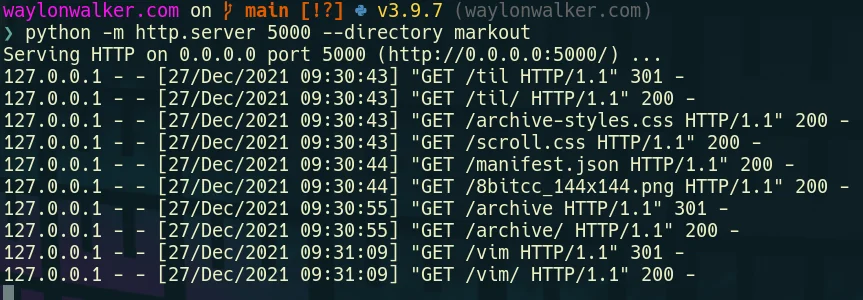
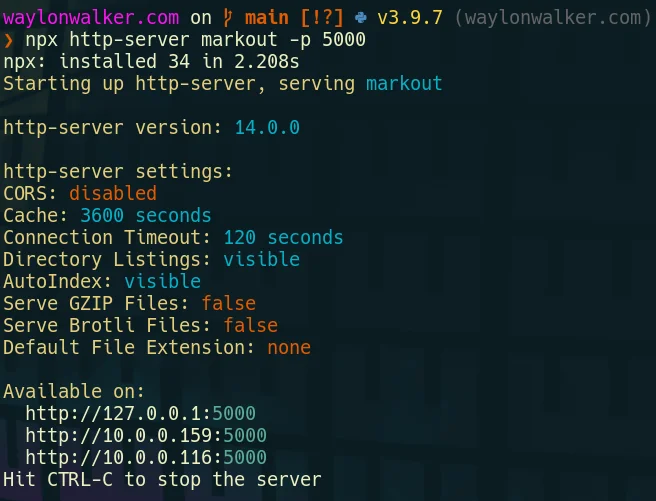
When I first moved to vim from and ide like vscode or sublime text one of my very first issues was trying to preview my website at localhost:8000. There had always just been a button there to do it in all of my other editors, not vim. There are not many buttons for anything in vim. While there is probably a plugin that can run a webserver for me in vim, it’s not necessary, we just need the command line we are already in.

You will need a way to run another process alongside vim, here are a couple ideas to get you going that are not the focus here.style

Python already exists on most linux systems by default, and most are now on python3. If you are on windows typing python will take you directly to the windows store to install it, or you can also use wsl.

# python3 python -m http.server # running on port 5000 python -m http.server --directory markout 5000

# for the low chance you are on python2 python -m SimpleHTTPServer # running on port 5000 python -m SimpleHTTPServer 5000 python -m SimpleHTTPServer --directory markout 5000 

...

Open files FAST from zsh | or bash if thats your thing

https://youtu.be/PQw_is7rQSw

I am often in a set of tmux splits flying back and forth, accidentally close my editor, so when I come back to that split and hit my keybinds to edit files I enter them into zsh rather than into nvim like I intended. Today I am going to sand off that rough edge and get as similar behavior to nvim as I can with a couple of aliases.

Make sure you check out the YouTube video to see all of my improvements.

...

How linux users install a text editor

In honor of the neovim 0.6.0 release, I decided to do a funny skit installing neovim, and fix up my install script in the process as part of my challenge to fix up my dotfiles. I ran into one snag where I was not updating the repo that I cloned. I moved it to the directory I now keep third-party git repos and set it to update with ansible.

https://youtu.be/64oKLphhBuo

The thing that took me the longest to realize was…. I had a path issue pointing me to an old install of the appimage over the fresh build, fixed that up and now we are on 0.7.0 nightly.

...

30 days dotfile ricing

https://youtu.be/Jq1Y48F_rOU

I am challenging myself to 30 days of dotfile ricing. I have been on linux desktop for a few months now and have a pretty good workflow going, I have the coarse edits done to my workflow, but it has some rough edges that need sanded down. It’s time to squash some of those little annoyances that still exist in my setup.

This is primarily going to be focused on productivity, but may have a few things to just look better. This will comprise heavily of aliases, zsh, and nvim config.

...

Update Alternatives in Linux

update-alternatives --query python update-alternatives: error: no alternatives for python sudo update-alternatives --install /usr/local/bin/python python `which python3.8` 2 # update-alternatives: using /usr/bin/python3.8 to provide /usr/local/bin/python (python) in auto mode sudo update-alternatives --install /usr/local/bin/python python `which python2.7` 5 # update-alternatives: using /usr/bin/python2.7 to provide /usr/local/bin/python (python) in auto mode update-alternatives --query python # Name: python # Link: /usr/local/bin/python # Status: auto # Best: /usr/bin/python2.7 # Value: /usr/bin/python2.7 # # Alternative: /usr/bin/python2.7 # Priority: 5 # # Alternative: /usr/bin/python3.8 # Priority: 2 sudo update-alternatives --install /usr/local/bin/python python `which python3.8` 20 # update-alternatives: using /usr/bin/python3.8 to provide /usr/local/bin/python (python) in auto mode

I made a neovim plugin

I’ve slowly adding more and more lua functions into my neovim configuration, and recently I noticed a pattern for a class of functions that reach out to run shell commands that can be abstracted away.

https://youtu.be/8m5ipBuopPU

Check out the project readme for the most up to date details on the plugin itself.

...

tmux targeted session

https://youtu.be/5KE7Il7SOEk

This is something that I made up but use every single day, this is what keeps much of what is on my blog or my teams private work wiki going. I have a few very important directories that I have assigned directly to a hotkey for fast session switching.

bind -n M-i new-session -A -s waylonwalker_com "cd ~/git/waylonwalker.com/ && nvim" bind i popup -E -h 95% -w 95% -x 100% "tmux new-session -A -s waylonwalker_com 'cd ~/git/waylonwalker.com/ && nvim'" bind -n M-I popup -E "tmux new-session -A -s waylonwalker_com 'cd ~/git/waylonwalker.com/ && nvim'"

...

tmux detach

https://youtu.be/A1qx3tNKDdA

tmux detach is a handy tmux command that will quit your current session while keeping it running. The full name of the comamnd is detach-client, detach is a shorthand.

default keybinding

...

notify-send

xinput float $(xinput list --id-only "AT Translated Set 2 keyboard") | notify-send "laptop keeb floated" -i ~/Pictures/8bitcc.png

tmux attach

https://youtu.be/JQ0yDCVu44E

attach is one of the most useful features of tmux. If you have no interest in tmux for pane and window management, you should use tmux for this. It can be a life saver if you ever get disconnected from the host machine or accidently close your terminal you can connect right back into the session you were just in using attach.

tmux attach

this command will simply attach back to tmux if you are ever disconnected

...

tmux command line

https://youtu.be/SNu-4IrkjAs

So far we have covered a lot of tmux commands and how they map to keybindings but these same commands can be executed at the command line.

Let’s make a popup that displays our git status for 5s or until we close it manually. We can run the following command at the command line, in a split.

...

tmux copy-mode

https://youtu.be/-ypY_-VmBKk

tmux copy-mode is a tmux mode that lets you scroll, search, copy, and jump your way through a pane. There are a ton of keybindings for copy-mode, the main ones you will need to know are / for searching down ? for searching up, n for next item, space for starting a selection, and enter to copy the selection. Arrow keys will be used for navigation unless you have specified vi mode, then it will be hjkl.

Default keybinding to get into copy mode is prefix+[.

...