Check out 99 [1] by ThePrimeagen [2]. It’s a well-crafted project with great potential.
Neovim AI agent done right
References:
[1]: https://github.com/ThePrimeagen/99
[2]: https://github.com/ThePrimeagen
Publishing rhythm
Convert a video from dark mode to light mode with FFmpeg!
Here
cassidoo.co [1]
Converting video from dark mode to light mode after the fact is a pretty great idea, I’m surprised at how well it does. Its definitely not perfect, but looks really good.
References:
[1]: https://cassidoo.co/post/ffmpeg-dark-light/


I saw this tip from Cassidoo and had to try it out for myself. I kicked on a screen recording right from where my terminal was, converted it, and it actually looks pretty good.
ffmpeg \
   -i screenrecording-2026-01-01_10-10-49.mp4 \
   -vf "negate,hue=h=180,eq=contrast=1.2:saturation=1.1" \
   screenrecording-2026-01-01_10-10-49-light.mp4
Dark Mode
Light Mode
There are a few unsettling things about it, but overall I feel like it was a success.




-
I actually like linus’s take here. My parents dropped $4k (~$8k in todays money) on a computer when I was a kid, (which turned into something too $$ to let me touch at that point). I played some educational games that no one else has heard of and I’ve long forgotten along with an early ciivilization game. It was e-waste in 2 years we maybe kept it 5, and it was barely working. Contrast this to my PC now I spent $2k on 3 years ago refurb from 2017, and it has no signs of age from me, does everything I need it to. Ram crisis sucks, the outright reason behind it sucks. But on the bright side you can still get a baller build for less than you could late 90s without inflation. The industry is not there for consumers right now, we had better times, but its still not bad times. Keep the hope alive that good times will come.
Smartphones are black holes
They can bend spacetime without you even realizing it. People often get offended when I tell them that I don't have a phone, thinking that I'm lying and I just
Sylvain Kerkour · kerkour.com [1]
This sounds great…. I’m sick AF right now and dont want to do anything but watch YouTube, and let opencode do my work.
References:
[1]: https://kerkour.com/smartphones-blackhole
-
Yeah there’s some basics, you know things you might expect like using standard error and standard out correctly. One thing I’ll say on that because I think this is commonly misunderstood, standard error is not for errors, it’s for any information that isn’t part of the normal output. So you know often times that’s warnings and errors, but it might just be progress information. You know anytime that you just need to have something go to the user that’s what it’s there for." (6:15 - 6:42)
I’ve definitely done this sin in my own tooling before, and it does make things harder to use. I think I still take err/out at face value. I really like the translation Jeff gave here, one is for normal output, i.e. what the user asked for and the other is extra information. So if I wanted to list something and pipe it into something else, stdout only captures the list, thats it. if you have a bunch of information about config warnings, showing environment, are you sure questions, none of that is captured.
The work on usage [1] by jdx [2].
A specification for CLIs
References:
[1]: https://github.com/jdx/usage
[2]: https://github.com/jdx
I’m impressed by pitchfork [1] from jdx [2].
Daemons with DX
References:
[1]: https://github.com/jdx/pitchfork
[2]: https://github.com/jdx
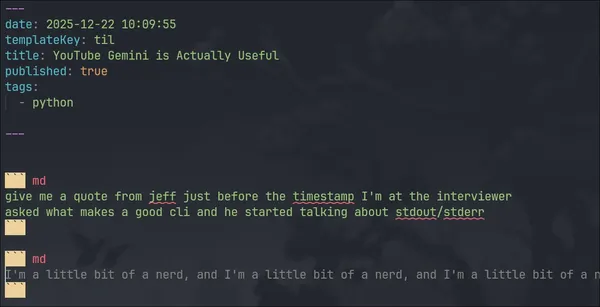
I’ve found Gemini to be very useful lately, especially for finding information within long form content.
When writing thought-896, I wanted to use a direct quote from Jeff Dickey, Gemini popped it out very quickly.
give me a quote from jeff just before the timestamp I'm at the interviewer
asked what makes a good cli and he started talking about stdout/stderr
In another case, my wife and I are huge Good Eats fans. Alton Brown taught us how to cook during college and on. We watched every single good eats episode nearly 10 years after they aired. He is back with some updates to those those shows on his Youtube. Gemini gives very good detailed responses with timestamps.
Alton Brown had a recent YouTube video for cooking turkey. Can you get the
instructions from the video?
Ping 15
[mise](https://mise.jdx.dev/getting-started.html) looks like what I wanted nix to be for me.
The work on mise [1] by jdx [2].
dev tools, env vars, task runner
References:
[1]: https://github.com/jdx/mise
[2]: https://github.com/jdx
Mise looks promising
I've been all in on just for a while now, but mise looks so good it might
be my next move.
Maxteabag [1] has done a fantastic job with sqlit [2]. Highly recommend taking a look.
A user friendly TUI for SQL databases. Written in python. Supports SQL server, Mysql, PostreSQL and SQLite, Turso and more.
References:
[1]: https://github.com/Maxteabag
[2]: https://github.com/Maxteabag/sqlit
webi-installers [1] by webinstall [2] is a game-changer in its space. Excited to see how it evolves.
Primary and community-submitted packages for webinstall.dev
References:
[1]: https://github.com/webinstall/webi-installers
[2]: https://github.com/webinstall

You Might Also Like: My Notes Blog
Writing about the big beautiful mess that is making things for the world wide web.
blog.jim-nielsen.com [1]
I really like a good link blog, it’s the old timers version of a reaction video. It gives me new posts to discover from other writers, and gives additional perspectives from ones I trust enough to add to my RSS.
It’s nice to have a place where I can jot down a few notes, fire off my reaction, and nobody can respond to it lol. At least, not in any easy, friction-less way. You’d have to go out of your way to read my commentary, find my contact info, and fire off a message (critiquing or praising). That’s how I like it. Cuts through the noise.
Ditto Jim. I’ve oddly found mine more useful to search than blog posts, zettlekaten, notes, whatever you want to call them. For me writing something down makes it more concrete in my brain that I’m less likely to need to go reference, but I often need to re read or references posts from others, this is where Thoughts [2] comes in handy for me
Like Jim I have a bunch of feeds [3] you can subscribe to if you want some or all of my stuff, but I aggregate everything to the same root site.
References...
Gross phone
Is there a world that giving my phone to my kids does not result in it being
covered in peanut butter and snot?
Developer Vs Artist Ai
The other day I was watching [thePrimeTimeagen]https://youtube.com/@theprimetimeagen?si=jVcp23FbfQSFZfDc) and he talked about devs loving ai and artists revolting. There was some discussion in chat about art being more creative and prime quickly squashed that. He ended with being oddly confused why developers are jumping on board and artists are not. Both had their art stolen to build out the models.
[1]
my own vibes
I'm writing this from my phone without further research, all vibes, personal experience, and thoughts, no research.
Good Tools # [2]
First I want to argue that artists have had some form of ai in their tools for years. Idk, probably not ai as we know it today but functionally similar. Content aware fill. This is a Photoshop feature from Adobe, as far as I know it’s one of the special things you get from Adobe that you don’t get from the FOSS alternatives easily.
This is an example of a good took that is well loves by the community and widely used, if you put ai i...
“You should never build a CMS” | Sanity
Lee Robinson migrated cursor.com off Sanity. He made good points. Here's what he missed.
Sanity.io · sanity.io [1]
Such a good breakdown of the leerob article, that is hitting everywhere right now. Feels like sanity was just a bit late to getting things right and it would have just worked for them how leerob was trying to use it, but MCP sucked so he jumped.
Reading their loose descriptions of a CMS, its an interesting realization to realize I’m rolling my own cms. I kinda feel like theres a few inspiration features to take from here, but I have no regrets. As a developer I like being able to build my own tools, I like being able to search and edit from nvim, and not have to write GROQ queries, and transforms. There were some really good points here that as I get more and more content on my personal site, I do kinda feel it. I’m surprised there is not more tooling that does some of these things for piles of markdown.
pinning this to re-read later, feels like a lot of good tidbits here.
References:
[1]: https://www.sanity.io/blog/you-should-never-build-a-cms
-
It really feels like M$ is coming down hard on GH lately to make some unfavorable decisions for users. Maybe there is good reason for all of these changes from a business perspective, I can’t judge that. But right now there are some really great alternatives out there. I’m so grateful for what forgejo and gittea offer, and at the same time seeing the community get split up from GH is sad.
Ping 12
Is `bet` new teen lingo? My kid is starting to say _bet_ in every sentence.
> So he explained it as "I'm down", "You bet", "Yes", "I like that", "You betcha"
-
Silksong DLC announcement already, we waited 8 years for the game, and are getting DLC’s months after launch. Dudes I haven’t even finished the game get, maybe not even half way. It’s amazing. Its amazing that these three make such a kick ass game with great art, story, voice, gameplay, and now drop a free dlc in 2026.
Ping 11
Naming things is hard, pings will now be numbered.
I'm being gaslit by the ai
I'm being gaslit by the ai. It just did a big hard change, now cant do a seemingly basic change, and assures me that that its fixed my issue on every iteration.

I’ve been using this one for awhile now, I have a post type that I only edit from my phone, but I have all the post numbered. I set up a template in obsidian for using templater, the template goes right in the static site repo, I point templater to the templates directory and this has been working pretty seamlessly for awhile.
---
date: <% tp.date.now("YYYY-MM-DD HH:mm:ss") %>
templateKey: myposttype
published: true
tags:
- myposttype
<%*
const folder = "pages/myposttype";

// get all files in the vault, keep only those inside the folder
const files = app.vault.getFiles().filter(f => f.path.startsWith(folder + "/"));

// extract numeric suffixes from filenames like myposttype-123.md
const nums = files.map(f => {
  const m = f.basename.match(/^myposttype-(\d+)$/);
  return m ? parseInt(m[1], 10) : null;
}).filter(n => n !== null);

// next number (start at 1 if none exist)
const next = (nums.length ? Math.max(...nums) : 0) + 1;

// include the .md extension when moving
const newPath = `${folder}/myposttype-${next}`;
await tp.file.move(newPath);
%>
---
-
Kelsey has a really good lightbulb moment here about platform engineering.
“if you had to do all the deployments for the entire company what questions would you ask of the development team?”
That’s your api, your platform, this is your product as a platform engineer. It’s not images, docker, terraform, hcl, yaml, kubernetes, It’s building out the right api for your company to deploy its products effectively.
https://www.youtube.com/watch?v=HdUbTyvrfKo&t=429s [1]
timestamped
References:
[1]: https://www.youtube.com/watch?v=HdUbTyvrfKo&t=429s
Check out andrii-kryvoviaz [1] and their project slink [2].
Self-hosted [3] image sharing service
References:
[1]: https://github.com/andrii-kryvoviaz
[2]: https://github.com/andrii-kryvoviaz/slink
[3]: /self-host/
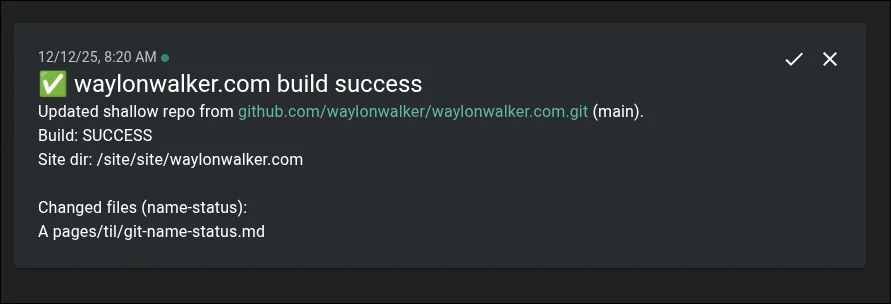
notifications for static site builds
This morning I set up notifications for changes to my static site builds
leveraging git name status [1] and ntfy.
References:
[1]: /git-name-status/
--name-status is a great way to see what files have changed in a git diff
alongside the status code. I recently used this in a script to create a report
of new and modified files during a build.
git diff --name-status
git diff --name-status origin/main
git diff --name-status --staged
git diff --name-status 'HEAD@{3 days ago}'

fast changing dev server today
The dev server is cooking today, I've dropped markata builds from 2m40s (hot cache) in prod
to 15s (hot cache) in dev. Currently building 2745 posts and 274 feeds.
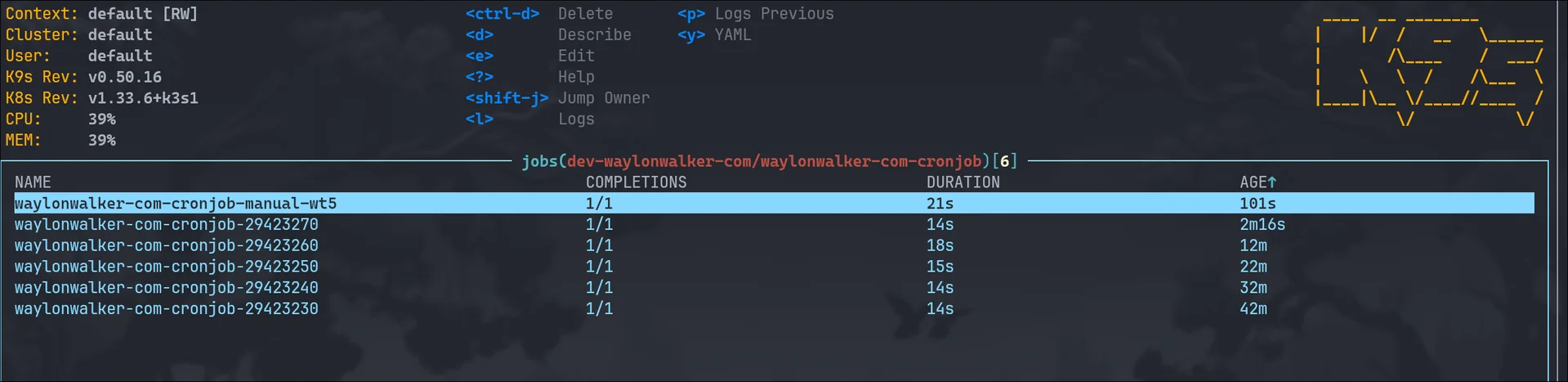
The Right Reasons To Run Kubernetes In Your Homelab
Running kubernetes in your homelab [1] is a fantastic way to learn, explore, express
yourself, and run services that you use.
The Right Reasons To Run Kubernetes In Your Homelab # [2]
There are not many
- You want to learn kubernetes
- You like kubernetes
- You want to learn to scale
There are also The Wrong Reasons To Run Kubernetes In Your Homelab [3]
You want to learn kubernetes # [4]
Homelabbing is a such a great way to learn new skills, deploy real apps that
you use. Create new custom apps for your specific use cases that no one else
has. You should absolutely run kubernetes in your homelab if you want to learn it.
I would recommend to start locally, pull up kind, minikube, or k3d and start
from your local machine before putting it on a server.
When you decide you are ready for a server, you probably don’t need any crazy
hardware. You can probably run on some old retired Dell Optiplex or an old
desktop someone is throwing out as it no longer runs windows.
You like ku...
I learned to today that setting MEMORY on your minecraft server causes the
JVM to egregiously allocate all of that memory. Not setting it causes slow
downs and potential crashes, but setting INIT_MEMORY and MAX_MEMORY gives
us the best of both worlds. It is allowed to use more, but does not gobble it
all up on startup.
In this economy we need to save all the memory we can!
Here is a non-working snippet for a minecraft server deployment in kubernetes.
      containers:
        - name: dungeon
          image: itzg/minecraft-server
          env:
            - name: EULA
              value: "true"
            - name: INIT_MEMORY
              value: "512M"
            - name: MAX_MEMORY
              value: "3G"
and in docker compose
  dungeon:
    image: itzg/minecraft-server
    environment:
      EULA: "true"
      INIT_MEMORY: "512M"
      MAX_MEMORY: "3G"
-
I did not realize all the places to be considered as AI water usage. Hank goes deep highlighting all of the sources he is aware of, most reports leave off a lot of these sources, some reports go maybe too far adding sources that may not make sense depending on the question you are asking.
As someone that runs computers with gpus in their house, and watching LTT make AIO installs on GPUs I’ve wondered what would AI use water for, now I understand that its a lot. No where near agriculture, but a lot.
Unlike running a gpu in your house, potentially with a closed loop AIO, data centers are filled with hardware making heat and it all must go somewhere. Current technology has this done with evaporative cooling, i.e. its not a closed loop, the water goes into the sky.
He goes on to point out that its not just the data center, using water, but also chip fab and power plants.
Something I hadn’t put a lot of thought into is the type of water. While a lot of agriculture and power applications do not use municipal water, a lot of data centers do, putting excess strain on water treatment.
Something I find interesting is that Altman is doing the same thing here that he does on his fin...