iodine [1] by yarrick [2] is a game-changer in its space. Excited to see how it evolves.
Official git [3] repo for iodine dns tunnel
References:
[1]: https://github.com/yarrick/iodine
[2]: https://github.com/yarrick
[3]: /glossary/git/
Publishing rhythm
blakewatson.com turns 20 - blakewatson.com
I bought this domain as a college student using a friend’s credit card. Twenty years later, it’s one of the best decisions I've ever made.
blakewatson.com [1]
20 years is a long time to work on something, congrats Blake! So many great links to small web creators, why, and how to build your own site.
As algos turn to shit the small web remains a space that cannot be ruined. There will always be rss feeds from real humans writing for other humans.
References:
[1]: https://blakewatson.com/journal/blakewatson-com-turns-twenty/
I recently discovered Termix [1] by Termix-SSH [2], and it’s truly impressive.
Termix is a web-based server management platform with SSH terminal, tunneling, and file editing capabilities.
References:
[1]: https://github.com/Termix-SSH/Termix
[2]: https://github.com/Termix-SSH
ThePrimeagen (@ThePrimeagen) on X
there is literally no universe that this is true
10k lines and its not bug filled crap? ok Lex Luthor, its time to step away from the keys
X (formerly Twitter) · x.com [1]
there is literally no universe that this is true
10k lines and its not bug filled crap? ok Lex Luthor, its time to step away from the keys
Is this 10k real production code? Dry in the sense that it hasn’t re-implemented the same s3 api dozens of time? What language are we talking something dense like python? something very verbose like html [2]? Maybe a language where you implement everything from scratch like lua. This matters a lot. Playing with little POC applications that dont mean anything I can quickly come up with 500-1k likes of code that I may never look at again. I’m sure I can come up wtih 10k decent lines of code a day.
But for the same application without duplicating everything over and over? For something that moves the needle and really matters?? every single day?? Consistently +10k, not 10k changes, not 10k deletes of yesterdays code. nah thats wack.
References:
[1]: https://x.com/ThePrimeagen/status/1953502301173244004
[2]: /html/
2025-08-08 Notes
I found this post from miriam.codes while reading dbushell's notes. I kinda agree with Miriam and David here. AI is really making me feel like an old...
If you’re into interesting projects, don’t miss out on nwg-look [1], created by nwg-piotr [2].
GTK3 settings editor adapted to work in the wlroots environment
References:
[1]: https://github.com/nwg-piotr/nwg-look
[2]: https://github.com/nwg-piotr
The Brutalist Report
The day
brutalist.report [1]
Discovered the Brutalist Report from CJ [2] on syntax.fm on their rss-is-not-dead [3] episode. The way he described it, I was like gnaw thats whack, not into it, but I had to check it out. It’s actually great! Except the political shit, I go to rss to get away from political finger pointing. The Hacker News list is great, maybe I need to pay more attention to hacker news??
References:
[1]: https://brutalist.report/
[2]: https://coding.garden/
[3]: https://syntax.fm/show/926/rss-is-not-dead
Omarchy is on the move
Omarchy has been improving at a furious pace. Since it was first released on June 26, I've pushed out 18(!) new releases together with a rapidly growing community of collaborators, users, and new-t...
world.hey.com [1]
It’s facinating how many people are making the jump from mac/windows, not just to linux, not just to archlinux, but to a full on tiling window manager. DHH has omakub and omarchy. Omakub is advertised as easy and for beginners, but many are skipping right over that to go straight for the hard stuff.
DHH mentions hyprland here, one thing I think he is missing is that this is the first real mainstream tiling window manager that is a competitor to i3, awesomewm, qtile that runs Wayland. I think they were able to pull a bunch of great benefits such as lack of screen tearing and animations from this.
References:
[1]: https://world.hey.com/dhh/omarchy-is-on-the-move-8f848fa4
YouTube has earned its crown
I often give Google a lot of shit for shutting down services whenever they're bored, hire a new executive, or face a three-day weekend. The company seems institutionally incapable of standing behin...
world.hey.com [1]
I wonder how much of killed-by-google [2] is due to is 20 percent time [3]. Allowing engineers to follow a passion project turns into a real product that doesn’t have full backing and support of the company.
similar to DHH as much as I am hurt by reader and all of their privacy BS that comes from ad based revenue I appreciate YouTube and them supporting all of the creators on it. Giving a platform for small creators the ability to sustain themselves and reach a larch audience without big coorporate rules.
References:
[1]: https://world.hey.com/dhh/youtube-has-earned-its-crown-48f12ccc
[2]: https://killedbygoogle.com/
[3]: https://thoughts.waylonwalker.com/post/787
[1]
Googles 20 percent time is fascinating to me. It seems like a great way for engineers to fill up their tank with new skills, passion projects, and the need to scratch an itch. To me these days it feels like something that would incentivize good talent to join.
I can remember back earlier in my career December and January were slow months for big companies. Riddled with vacation and annual planning cycle. I would use this time to create tools and libraries that would help me move quicker throughout the year.
I clearly remember having a conversation with a colleague several salary grades ahead of me come mid February asking what I was up to. I was furiously pecking away at some of these projects while he let me know that he had been waiting for this years plan for months and had no tasks from the boss.
That said, I don’t think any major tech company is going to adopt 20% time these days. It’s too chaotic, too hard to manage and impossible to measure.
This line from Ted feels exactly why 20 percent time generally blows up and likely turns into another killed-by-google [2] product that has a small user base and is furious about it being killed. With enough of these at least...
Blog
tonsky.me · tonsky.me [1]
Niki has one of the coolest yet simple personal sites that I have seen in a long time. We need more of this on the internet! hover over his face, try dark mode, submit personal data, there are so many really cool Easter eggs to discover!
References:
[1]: https://tonsky.me/
We shouldn’t have needed lockfiles
Lockfiles are an absolutely unnecessary concept that complicates things without a good reason. Dependency managers can and are working without it just the same.
tonsky.me · tonsky.me [1]
I wholeheartedly agree that packaging is broken, semver is broken, expecting much better from a system of oss that is built on top of volunteers, passion projects, nights and weekends is a fools errand. With that I disagree that we we dont need lockfiles. Maybe its Nikki’s experience in java and my lack that puts us on this opposite spectrum, but without lockfiles the world changes underneath us as we release. One small change to your source can introduce a whole set of new features/bugs that you did not plan on without a good locking system. It can also cause you to need to do dependency resolution at application build time and not ahead of time.
References:
[1]: https://tonsky.me/blog/lockfiles/
[1]
Fantastic write up on their experience in ai, opinions on ai being a hoax with a veil of reasonable usefulness. Arguing that most people do not understand enough to see the difference, and thought leaders see where it is now, see where it was yesterday, it must be going to general intelligence tomorrow and you all will loose your jobs without this. I appreciate the satirical language here.
References:
[1]: /static/https://ludic.mataroa.blog/blog/i-will-fucking-piledrive-you-if-you-mention-ai-again/?ref=wheresyoured.at
-
Letting Ai drive code feels like giving up so much control. It feels like its leaving so many brain cycles open for other things, yet its not quite good enough to do production level things on its own, so we must watch it, we must review it, yet its code can be some of the worst to review left unattended. I’m feeling this right now as I’m avoiding writing a bit of js that I could probably do myself. Some day this is likely to flip, and it will get better and we will spend our brain cycles thinking about architecture, security, marketing, big picture ideas about the problem we are trying to solve, but we are not yet there and as long as we still need to review I find it a much more pleasant workflow to have in a separate window than have it change the whole fucking project for a simple change.
A quote from greyduet on r/teachers
I teach HS Science in the south. I can only speak for my district, but a few teacher work days in the wave of enthusiasm I'm seeing for AI tools …
Simon Willison’s Weblog · simonwillison.net [1]
Woof, ai is sucking the soul from everything, being forced onto teachers who don’t want or care about it and are simply sharing ai-slop to their kids without giving it much thought. remember that it is rude [2] to share ai-slop with others that you have not vetted, It’s next level to turn this into teaching material for children who are forced into your classroom and have no choice about the matter, you should be ashamed.
References:
[1]: https://simonwillison.net/2025/Aug/5/greyduet-on-rteachers/#atom-everything
[2]: https://distantprovince.by/posts/its-rude-to-show-ai-output-to-people/
2025-08-05 Notes
Yesterday I started building out some qrcode tooling for myself starting with qrcode.waylonwalker.com. This is part of my tinyapps project.
I have a couple of use cases for simple qr codes in python coming up. One is
for blog posts, the other is for auth into a new server application logged to a
terminal. I tried the qrcode library
and it does not look as nice to me and I found
pyqrcode to be quite nice.
import pyqrcode
url = pyqrcode.create('https://waylonwalker.com/qr-codes-in-python')
url.svg('qr-codes-in-python.svg', scale=8)
print(url.terminal(quiet_zone=1))
url.svg('qr-codes-in-python.svg', scale=12)
url.svg('qr-codes-in-python.svg', omithw=True) # width is controlled by the container

url.svg('qr-codes-in-python.svg', omithw=True, module_color='#ffd119')
url.svg('qr-codes-in-python.svg', omithw=True, module_color='#ff69b4', background='#2b034c')
result #
Here is the final svg result.
Here is what it looks like in the terminal.

If you want fancier qrcodes check out https://mydigitalharbor.com/
Colors • Pico CSS
Pico comes with 380 manually crafted colors to help you personalize your brand design system.
Pico CSS · picocss.com [1]
A great alternative to tailwind colors that has everything defined in one colors file for only 0.3kb. it feels well worth the weight if you are trying to skip a build step or avoid npm/node. It has even more colors than tailwind. I appreciate that there is a grey palette that is fully desaturated.
References:
[1]: https://picocss.com/docs/colors
GitHub - rushter/selectolax: Python binding to Modest and Lexbor engines. Fast HTML5 parser with CSS selectors for Python.
Python binding to Modest and Lexbor engines. Fast HTML5 parser with CSS selectors for Python. - rushter/selectolax
GitHub · github.com [1]
Selectolax you have my attention! I will be giving this a try for markata which often suffers from slow beautifulsoup. It appears to have everything I need for my simple use cases.
[2]
References:
[1]: https://github.com/rushter/selectolax
[2]: https://dropper.waylonwalker.com/api/file/b5d8930f-59e0-4947-9500-717f66ce33dc.png
If you’re into interesting projects, don’t miss out on selectolax [1], created by rushter [2].
Python binding to Modest and Lexbor engines (fast HTML5 parser with CSS selectors).
References:
[1]: https://github.com/rushter/selectolax
[2]: https://github.com/rushter
I like rqlite’s [1] project rqlite [2].
The lightweight, user-friendly, distributed relational database built on SQLite.
References:
[1]: https://github.com/rqlite
[2]: https://github.com/rqlite/rqlite
How To Build The Tallest Building In Town
There are two ways you can build the tallest building in town. Once you understand this, things get really good.
Gary Vaynerchuk · garyvaynerchuk.com [1]
Have some positivity! “Just Build the Tallest Fucking Building” is one of my favorite Gary Vee quotes. Build good community, bring others up, and stop tearing everyone down, listen to the vid.
References:
[1]: https://garyvaynerchuk.com/build-the-tallest-building-in-town/
External Link
meetgor.com [1]
Yes, I can review the code and make changes, but who in the world loves reviewing code? Do you love reviewing peers’ PRs? really?
I’m with MeetGor here 100%. reviewing the nuance, not being as involved with the process of creating the architecture design, not solving the problems that arise in development make it hard to effectively review and not turn into LGTM man.
References:
[1]: https://www.meetgor.com/thoughts/i-kind-of-hate-agentic-ides-for-the-sake-of-productivity/
External Link
meetgor.com [1]
Sometimes, all you need is a mindset shift, a blocker in your mind that holds you back from doing certain things. And for me, I have consumed enough tutorials and posts about Kubernetes, that I need to put to use and create. I have been stuck in the learning cycle, lets push to prod with kubernetes.
This hurts. I know others with this learning style that need to see the full picture before actually doing something with new tech. The way I first got into kubernetes I was looking for the easy route and somehow k8s came up several times as a suggested route Looking for a Heroku replacement, What I found was shocking! [2], So I dove in head first with k3s [3] and kompose [4]. What I found was that it was not all that hard once you start to see how the pieces fit together, no amount of reading tutorials would have gotten me there.
Does anyone care if you use simple yet fragile bash scripts or heavy weight Kubernetes cluster for just clicking buttons and creating and updating rows in a database? No!
You know what, let’s fucking use Kubernetes.
Let’s Gooo. Use what is right for you and stop parroting kubernets is hard, heavy, for big companies, maybe...
External Link
meetgor.com [1]
If you want to use it for the purpose of learning it, please do use it.
Kubernetes as usual is a tool like others, you can’t use one tool everywhere. Where bash scripts work, they just work, where they don’t they fall apart too, kubernetes works like a charm.
Use your grug brains a little and choose wisely! In the end, who the hell cares if you use kubernetes or bash scripts to scale if your users are happy?
Well Said!
References:
[1]: https://www.meetgor.com/thoughts/kubernetes-isn-t-for-you/
Kubernetes Isn
Kubernetes isn
sliplane.io [1]
This post feels like it was written by someone who has never tried kubernetes, someone who reads twitter, listens to t3.gg and thePrimeagen (who cant even container let alone kubernetes). If you cant run linux, use bash, build your own docker images, run docker comfortably. If infra is not your thing kubernetes is probably not for you.
Kubernetes Was Built for Google
Just like how react was built for facebook to solve facebook problems with many teams contributing effectively to the same interactive interfaces. Turns out that react is actually a pretty good product if you have a highly interactive page, and if this is your bread and butter, you can make overly heavy static sites with too much build very effectively. It works and runs much of the internet now.
We are getting serious. We need serious tools.
Big companies use Kubernetes. We should too.
It feels more professional. It sounds like we know what we are doing.
If anyone uses these reasons to pitch kubernetes to me they don’t belong in a position to make any sort of decision. The first one could be a heading with maybe something under it.
But Kubernetes should not be y...
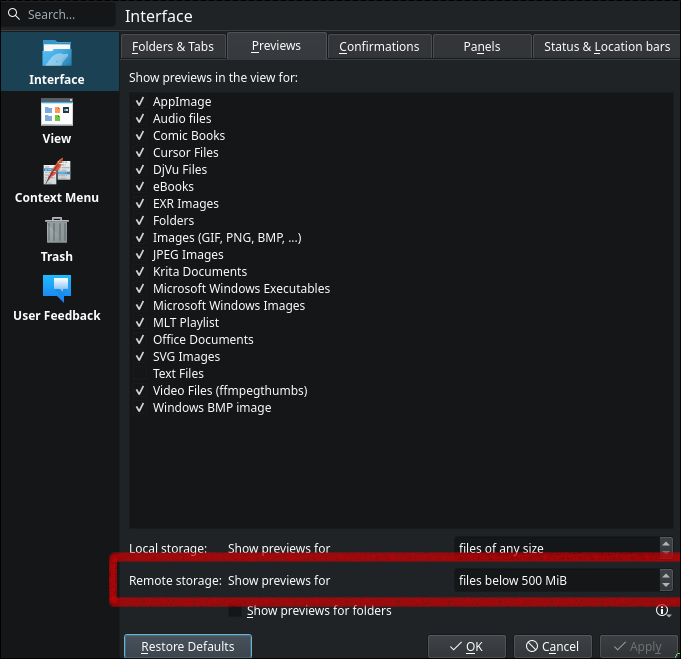
I’ve got a few samba shares going in my homelab, and I’m struggling finding a great app to scroll through vacation photos with my wife. I want something intuitive, non intimidating, and just works. Turns out that the default file browser application for hyprland works great, but you need to enable previews for remote storage for it to work for my use case here.
csi-driver-smb/deploy/example/smb-provisioner at master · kubernetes-csi/csi-driver-smb
This driver allows Kubernetes to access SMB Server on both Linux and Windows nodes. - kubernetes-csi/csi-driver-smb
GitHub · github.com [1]
Great guide to setting up a samba server right in kubernetes. I tried it out after too long of playing with trying to get connected to a samba share on ucore, no idea what was wrong, but this just works, and will live in my homelab [2] no matter what distro I’m on, no playbook required to set it up, just good ol k8s manifest. TBH I cheated and haven’t set up the secrets yet, so its not quite in argocd or in my github repo, but POC is there and it works as advertised without issue.
References:
[1]: https://github.com/kubernetes-csi/csi-driver-smb/tree/master/deploy/example/smb-provisioner
[2]: /homelab/
DHH (@dhh) on X
You have all the time you need, you're just spending it poorly. Don't tell me you don't have time for Linux or kids OR BOTH. You have time for all of it once you stop filling your day with junk act...
X (formerly Twitter) · x.com [1]
The message so many of us need to hear, stop scrolling and start creating. I’m not sure that I have a heavy issue with this, I barely scroll the socials anymore, I have my own rss reader curated with people that I enjoy consuming from. YT is often done as a family activity (with my wife) or listening while doing something like dishes. But I think I’ve been on the other side of this for awhile. There’s something that ticks my brain by twiddling with linux nonsensically or pip install thing-i-heard-about-today and try it. I’m not imune though, I often fill gaps in the day with nonsense short content, but try to avoid the short trap.
References:
[1]: https://x.com/dhh/status/1950462181331349688
-
How many times in one video can Prime say dude just use arch, dude arch would be way easier, dude you know how hard you are making this on yourself.
I do not envy those who desire full size configurability but stuck with the opinions of GatesJobs. Windows and Mac are so rigid, that it makes it impossible to do any level of customizability that I would want to do for productivity.
Unless you Must work on win/mack for some reason of work, you make something for one of them, you use Adobe, or you play competitive online multiplayer with easy anticheat there is a distro for you. The number of things that you need a win/mack for is greatly shrinking, you don’t have to submit yourself to the pain of Gates that this guy has done.

-
Copyparty looks like a feature full self hosted [1] file server, putting this into my check out later when I get back to my desk. Impressive number of features I didn’t even know were a thing all from one .py file.
References:
[1]: /self-host/
-
Ben sold me on the mini pocket pry here. It’s funny how so many minimalist tools become over the top titanium damascus with wild patterns and designs. they look amazing, but are they worth the insane price for simple things? I like my edc to be things I don’t worry about breaking, loosing, or giving away. Fancy ass prybars for $200+ gives me all of those negative feelings I don’t want on my edc.
2025-07-27 Notes
Today Wyatt and I conquered cathulu in Cat quest III.
-
Ben is always good for a banger of a video, this images app is something that i really want in my homelab [1], he did some great polish here! The idea of building vibe coded applications for your own personal use with all of your own personal opinions and workflows is something that has been an appealing part of ai, I’ve definitely tossed a few apps in my homelab that I use occasionally and they do what I ask of them pretty accurately.
This feels great to use, but also seems to kill any startup idea I have, as most of them feel like they could be vibe coded out by someone with a bit of skill and they just host their own. Maybe this is a good thing, maybe we are moving into an era of more people owning their own app they use for themself, maybe i need a security related startup?
References:
[1]: /homelab/
blender donut tutorial 2025
First Launch # [1]
[2]
my setup # [3]
[4]
Add # [5]
shift A
bump resolution scale # [6]
edit -> preferences -> interface -> resolution scale 1.25
[7]
orbit without middle mouse button # [8]
[9]
viewport shading rendered # [10]
[11]
References:
[1]: #first-launch
[2]: https://dropper.waylonwalker.com/api/file/ecd7349a-b04c-4496-8b34-3f2c82bdd790.png
[3]: #my-setup
[4]: https://dropper.waylonwalker.com/api/file/0baedcf5-9b6a-4ee3-b18f-76e695e00a8c.png
[5]: #add
[6]: #bump-resolution-scale
[7]: https://dropper.waylonwalker.com/api/file/d2c9fc7c-c689-4f6f-b2db-96bd8bb59ab3.png
[8]: #orbit-without-middle-mouse-button
[9]: https://dropper.waylonwalker.com/api/file/239a709b-7242-4a75-b100-f3a8cc533364.png
[10]: #viewport-shading-rendered
[11]: https://dropper.waylonwalker.com/api/file/cea5c464-53b2-4926-ab02-31107d84d23f.png
-
I don’t think I ever fully heard the full meaning of vsc*** and why it gets bleeped. I knew that it had to do with M$, but Teej explains it so well here. Its about the editor not really being open sources, but is marketed to be such.
Glossary Web Component
The one where I put the hypercard in the hyperlink
dbushell.com · dbushell.com [1]
I really enjoy David’s Glossary, he has absolutely nailed it. I’m working on one for myself that feels close but not quite. I want to have a list of words that auto glossary to terms for me, maybe this is too much automation and I should just lean on wikilinks, i.e. sick wikilink hover [2], they only take wrapping in brackets. But like David mentions here its a lot of work to make sure they are right on all the older posts. I think it needs to be done with js on my setup, I don’t have no fancy wroker to modify html [3] on the way out, I’m fully static right now, so i would need to do full rebuilds any time the glossary changes, i’m trying to cut down on the number of features that require full site rebuilds and potential cache issues.
References:
[1]: https://dbushell.com/2025/05/07/glossary-web-component/
[2]: /sick-wikilink-hover/
[3]: /html/
An Ode To My 10-Year-Old Thinkpad T440
mbrizic.com [1]
I like reading about old hardware and how to keep it running, sending shit out to e-waste after barely using it for a year makes my skin crawl. I find it interesting how most of these resurrections start with a linux build, and the author giving in and going for linux for the first time and enjoying being able to use something they thought was useless for real work.
That being said I have weird thoughts similar to this guy about being able to take a machine and write a novel somewhere off in the distance, but any time I try to do real work form any laptop these days the ergonomics become so unappealing that I tend to just not do anything away from my desk. Theres something that sounds so great about opening vim on old hardware that could last for hours, sip on coffee and write away, but it never works out like that in practice.
References:
[1]: https://mbrizic.com/blog/thinkpad-t440/
2025-07-24 Notes
Completed the 8-bit dungeon in Cat Quest III with wyatt today.
2025-07-23 Notes
Today I set up hypridle on my hyprland desktop build. It was not too bad, I'm probably going to tweak it as it I go if it bothers me, for now I'm giving it a...
2025-07-22 Notes
Next I ripped a calendar from the docs. When hovered I get a full year calendar, right click gives me only the current month.
Transparent Textures
transparenttextures.com [1]
Fantastic resource of background textures, I will be using this for some projects.
References:
[1]: https://transparenttextures.com/
uv run for running tests on versions of Python
Using uv run with make to replace tox or nox for testing multiple versions of Python locally.
https://daniel.feldroy.com · daniel.feldroy.com [1]
Such a fantastic use of uv, its so fast and flexible and does everything I need that next time I go to set up some more complex testing like this I’m going to lean towards it more than i would something like tox. In the post Daniel sets up matrix testing for testing out different versions of python with the same pytest test suite.
References:
[1]: https://daniel.feldroy.com/posts/2025-07-uv-run-for-testing-python-versions
2025-07-21 Notes
In my adventure to rice out hyprland I set up a sddm theme today, and it looks sick by only changing the wallpaper. I tried out one theme and was pretty...
2025-07-19 Notes
Progress on markata themes, I'm able to get feedback in the terminal. I'm building out a custom color model that will be able to mix and blend colors with...
[1]2025-07-09 Notes [1] from yesterday I have temporal stuff kind of going with postiz in a windsurf session working on [[thoughts-to-nostr]] Been cleaning up my z" loading="lazy">
2025-07-10 Notes | Nic Payne
2025-07-09 Notes [2] from yesterday I have temporal stuff kind of going with postiz in a windsurf session working on [[thoughts-to-nostr]] Been cleaning up my z
pype.dev
big fan of eza and dust, I like these aliases to have some common commands at my fingertips. I often use the tree command and yes it sometimes goes too deep to actually be useful.
alias lt='eza -T --level=2' # Tree view, 2 levels deep
alias ltt='eza -T --level=3' # Tree view, 3 levels deep
alias du1='dust -d 1' # Show only 1 level deep
alias du2='dust -d 2' # Show 2 levels deep
References:
[1]: https://pype.dev/2025-07-10-notes/
[2]: /2025-07-09-notes/
2025-07-18 Notes
fc is pretty great.
-
Love this dudes casual dry humor style, not afraid to poke fun at things with his dry ass satire. that being said, fc is new and as a long time fan of up arrow and !! I will be using this often.
I am a linux user through and through. Desktop, server, vms, containers,
everything except my phone is linux. With this I spend a lot of time in the
terminal, and have been a long time user of !! to rerun the last command, but
with the ability to tack something on at the beginning or end.
TIL about fc, which opens the last command in your shell history in your
$EDITOR or pass in your editor -e nvim.
Rcap of how !! works #
!! pronounces bang bang and will run the last command in your history.
ls -l

!! | wc -l
# ls -l | wc -l

sudo !!
# sudo ls -l | wc -l

!!:s/-l/-l \/tmp
# sudo ls -l /tmp | wc -l
fc enters the chat #
Now making complex edits in your shell can be a bit of a chore, so fc moves
this work to your $EDITOR.
fc
This pops open your $EDITOR with the last command in your history.
sudo ls -l | wc -l

Shell History #
fc shows up in shell history, but !! does not, !! gets replaced by the
command that it becomes.
Up Arrow #
yaya yaya, I know you can also up-arrow c-e, but what fun is that, it’s barely a
flex. fc just looks big brained and like you really know what you are doing.