Posts tagged: vim

All posts with the tag "vim"

29 posts latest post 2026-01-04
Publishing rhythm
Jan 2026 | 1 posts

A few of my friends and I all just borked our neovim configs during a plug update, and because none of us were using :PlugSnapshot it was painful to recover from.

https://twitter.com/pypeaday/status/1524882893914398732

Lucky for me I did it on a home machine that I only occasionally edit from, so I could still take the snapshot from a working machine before taking the plunge into fixing everying.

Snapshotting ensures that you install the same git sha on every single plugin. This way when you have multiple machines running your same vim config, they are all on the same sha of each plugin, and you dont end up with weird things happening on one machine. And then you get to decide when you are ready to update, rather than when it breaks.

...

vim

Let’s make a vim command to automatically collect all the links in these posts at the end of each article. Regex confuses the heck out of me… I don’t have my regex liscense, but regex can be so darn powerful especially in an editor.

Before you run someone’s regex from the internet that you don’t fully understand, check your git status and make sure you are all clear with git before you wreck something

Something that I have always appreciated form Nick Janetakis is his links section. I often try to gather up the links at the end of my posts, but often end up not doing it or forgetting.

Searchng through the internet I was able to find an article from Vitaly Parnas called

...

I recently found a really great plugin by mhinz to open files in neovim from a different tmux split, without touching neovim at all.

neovim-remote is not a neovim plugin at all, it’s a python cli that you can install with pip. Unlike the repo suggests, I use pipx to install nvr.

pipx install neovim-remote

How I use it #

I have this added to my .envrc that is in every one of my projects....

...

Anyone just starting out their vim customization journey is bound to run into this error.

E5520: <Cmd> mapping must end with <CR>

I did not get it #

I’ll admit, in hindsight it’s very clear what this is trying to tell me, but for whatever reason I still did not understand it and I just used a : everywhere.

If you run :h <cmd> you will see a lot of reasons why you should do it, from performance, to hygene, to ergonomics. You will also see another clear statement about how to use <cmd>.

E5520 <Cmd> commands must terminate, that is, they must be followed by <CR> in the {rhs} of the mapping definition. Command-line mode is never entered.

When to map with a : #

You still need to map your remaps with a : if you do not close it with a <cr>. This might be something like prefilling a command with a search term.

...

Creating a minimal config specifically for git commits has made running git commit much more pleasant. It starts up Much faster, and has all of the parts of my config that I use while making a git commit. The one thing that I often use is autocomplete, for things coming from elsewhere in the tmux session. For this cmpe-tmux specifically is super helpful.

The other thing that is engrained into my muscle memory is jj for escape. For that I went agead and added my settings and keymap with no noticable performance hit.

Here is the config that has taken

~/.config/nvim/init-git.vim

...

One of the first things I noticed broken in my terminal based workflow moving from Windows wsl to ubuntu was that my clipboard was all messed up and not working with my terminal apps. Luckily setting tmux and neovim to work with the system clipboard was much easier than it was on windows.

First off you need to get xclip if you don’t already have it provided by your distro. I found it in the apt repositories. I have used it between Ubuntu 18.04 and 21.10 and they all work flawlessly for me.

I have tmux setup to automatically copy any selection I make to the clipboard by setting the following in my ~/.tmux.conf. While I have neovim open I need to be in insert mode for this to pick up.

# ~/tmux.conf bind -T copy-mode-vi Enter send-keys -X copy-pipe-and-cancel "xclip -i -f -selection primary | xclip -i -selection clipboard" bind-key -T copy-mode-vi MouseDragEnd1Pane send-keys -X copy-pipe-and-cancel "xclip -selection clipboard -i"

To get my yanks to go to the system clipboard in neovim, I just added unnamedplus to my existing clipboard variable.

...

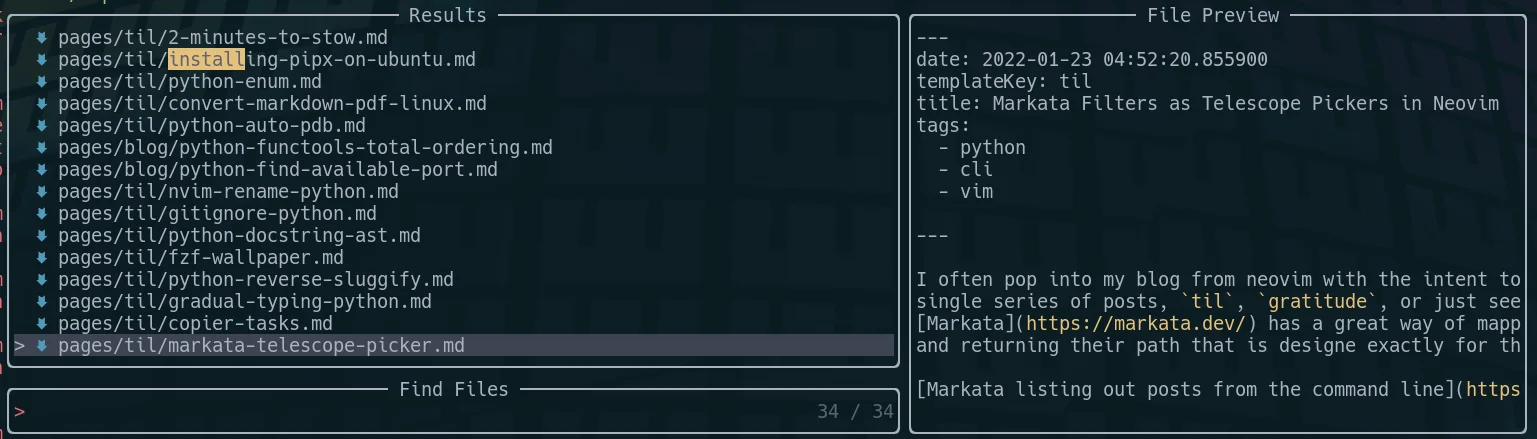
I often pop into my blog from neovim with the intent to look at just a single series of posts, til, gratitude, or just see todays posts. Markata has a great way of mapping over posts and returning their path that is designe exactly for this use case.

Markata listing out posts from the command line

To tie these into a Telescope picker you add the command as the find_command, and comma separate the words of the command, with no spaces. I did also --sort,date,--reverse in there so that the newest posts are closest to the cursor.

nnoremap geit <cmd>Telescope find_files find_command=markata,list,--map,path,--filter,date==today<cr> nnoremap geil...

...

I don’t use refactoring tools as much as I probably should. mostly because I work with small functions with unique names, but I recently had a case where a variable name m was everywhere and I wanted it named better. This was not possible with find and replace, because there were other m’s in this region.

I first tried the nvim lsp rename, and it failed, Then I pip installed rope, a refactoring tool for python, and it just worked!

pip install rope

Once you have rope installed you can call rename on the variable.

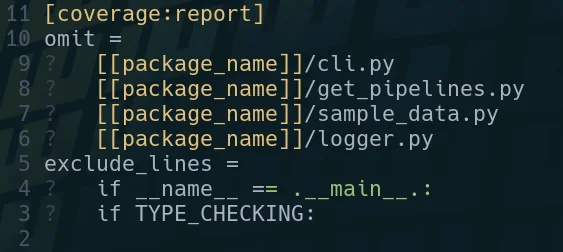
I’ve been stuck many times looking at a vim buffer with little question marks at the beginning of each line and trying to get rid of them. for so long I didn’t know what they were so trying to get rid of them was impossible.

It turns out they are tabs, and you can get rid of the little leading question marks with this substitution command.

One of the most useful skills you can acquire to make you faster at almost any job that uses a computer is getting good at finding text in your current working diretory and identifying the files that its in. I often use the silver searcher ag or ripgrep rg to find files in large directories quickly. Both have a sane set of defaults that ignore hidden and gitignored files, but getting them to list only the filenames and not the matched was not trivial to me.

I’ve searched throught he help/man pages many times looking for these flags and they always seem to evade me.

Passing the flag -l to ag will get it to list only the filepath, and not the match. Here I gave it a --md as well to only return markdown filetypes. ag supports a number of filetypes in a very similar way.

ag nvim --md -l

rg #

Giving rg the --files-with-matches flag will yield you a similar set of results, giving only the filepaths themselves and not the match statement. Also passing in the -g "*.md" will similarly yield only...

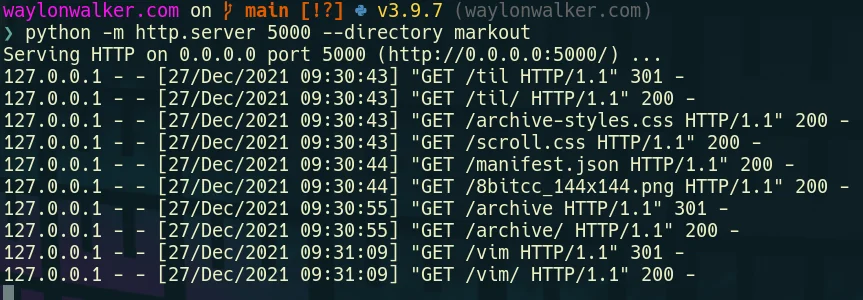
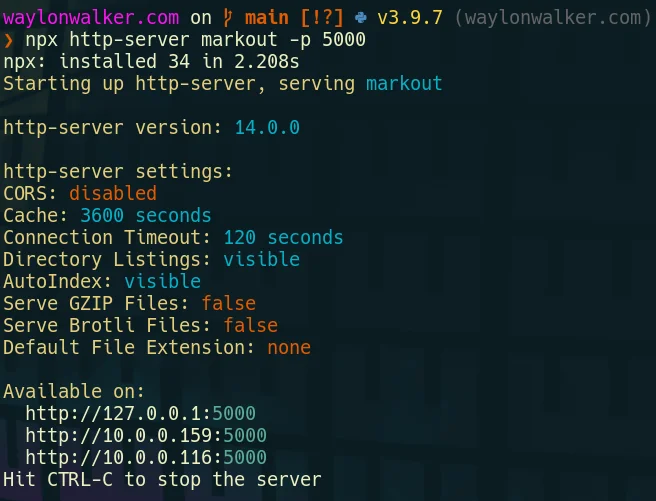
When I first moved to vim from and ide like vscode or sublime text one of my very first issues was trying to preview my website at localhost:8000. There had always just been a button there to do it in all of my other editors, not vim. There are not many buttons for anything in vim. While there is probably a plugin that can run a webserver for me in vim, it’s not necessary, we just need the command line we are already in.

You will need a way to run another process alongside vim, here are a couple ideas to get you going that are not the focus here.style

Python already exists on most linux systems by default, and most are now on python3. If you are on windows typing python will take you directly to the windows store to install it, or you can also use wsl.

# python3 python -m http.server # running on port 5000 python -m http.server --directory markout 5000

# for the low chance you are on python2 python -m SimpleHTTPServer # running on port 5000 python -m SimpleHTTPServer 5000 python -m SimpleHTTPServer --directory markout 5000 

...

Many command line tools can output a list of files, this is quite powerful. I often want to search for something, then open it from a fuzzy picker. This can be done with fzf in the terminal, but often I am already in vim and I want to open it inside my current session.

how to pass a custom command to telescope

Telescope is the fuzzy file finder I use every day inside of neovim. Its pretty fantastic and easy to extent like this. This first example I am only passing in files from the current working directory by using ls.

:Telescope find_files find_command=ls

This brings up a normal Telescope picker with results from the ls command.

...

vim

Finding hidden files using Telescope as you fuzzy file finder is not too hard, its a single flag passed in. Then it will use whichever file finder it can find [‘fd’, ‘fdfind’, ‘rg –files’, ‘find’, or ‘where’] in that order. These tools each have their own way of handling hidden files, but telescope takes care of that so all you need to do is pass in hidden=true.

I have this keymap set to help me list out all files including hidden files using the pnumonic go edit hidden. I use ge for quite a few different things to take me directly to a specific file or picker.

nnoremap geh <cmd>Telescope find_files hidden=true<cr>

see the implementation telescope finds your files.

vim

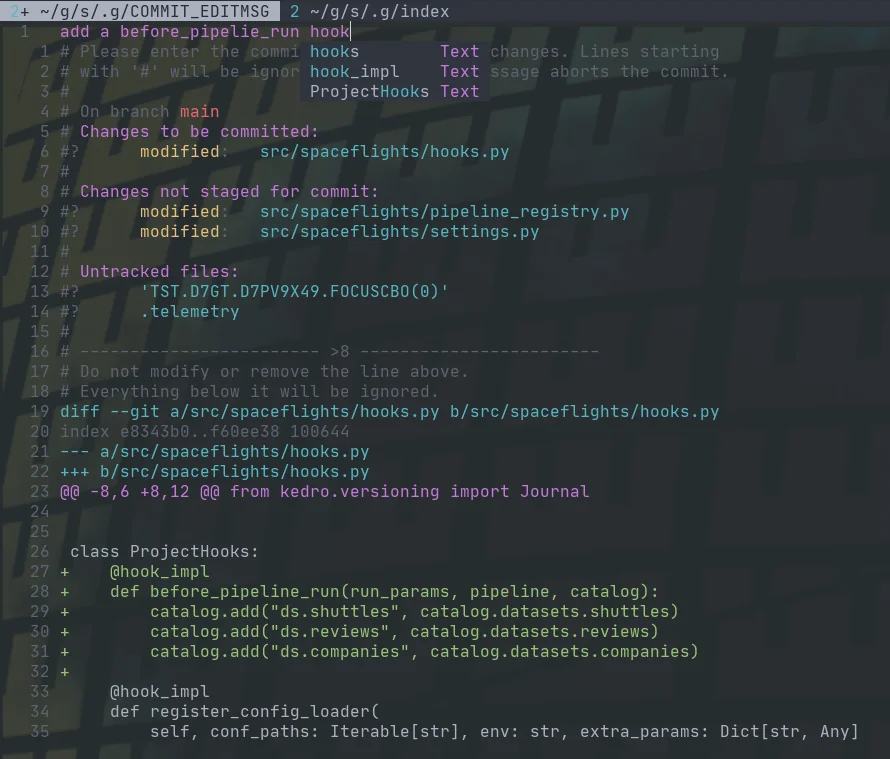
Fugitive comes with a pretty sick way to commit files and see the diff at the same time with verbose commit. Opening the fugitive menu with :G brings up your git status, you can stage files with s, unstage them with u, toggle them with -, and toggle their diff with >. Once you have staged your files for commit, you can commit with cc, but today I found that you can commit verbose with cvc. This brings up not only a commit widow with your git status shown, but the diff that you are about to commit.

example of a verbose commit in fugitive

How linux users install a text editor

In honor of the neovim 0.6.0 release, I decided to do a funny skit installing neovim, and fix up my install script in the process as part of my challenge to fix up my dotfiles. I ran into one snag where I was not updating the repo that I cloned. I moved it to the directory I now keep third-party git repos and set it to update with ansible.

https://youtu.be/64oKLphhBuo

The thing that took me the longest to realize was…. I had a path issue pointing me to an old install of the appimage over the fresh build, fixed that up and now we are on 0.7.0 nightly.

...

I made a neovim plugin

I’ve slowly adding more and more lua functions into my neovim configuration, and recently I noticed a pattern for a class of functions that reach out to run shell commands that can be abstracted away.

https://youtu.be/8m5ipBuopPU

Check out the project readme for the most up to date details on the plugin itself.

...

Notes for second vim-fundamentals course meetup

newline another

Mahesh Subrajmanium Venkatachalam - Plugins | Installing a Theme Hunter Phillips - Quickfix | Offline Ordering with getqflist Andrea Wackerle - Search & Replace | Macros

Matthew Fletcher - Registers | Advanced Motions Jump, Delete, & Select | Advanced Motions: Paste & Move Nicholas Payne - My First Vim Plugin | What Makes a Good Plugin Zev Averbach - Harpoon | Wrap up

...

1 min read

Modal jumping

nnoremap <leader>e :execute getline(&#34;.&#34;)<cr>j nnoremap <c-j> g, nnoremap <c-k> g; nnoremap <c-j> <c-]> nnoremap <c-k> g; nnoremap <c-j> :cnext<cr> nnoremap <c-k> :cprev<cr> nnoremap <c-j> :lnext<cr> nnoremap <c-k> :lprev<cr> nnoremap <c-j> :tnext<cr> nnoremap <c-k> :tprevious<cr> nnoremap <c-j> :trewind<cr> nnoremap <c-k> :tprevious<cr>