
Replacing text in vim can be quite frustrating especially since it doesn’t have live feedback to what is changing. Today I was watching Josh Branchaud’s Vim-Unalphabet series on Youtuve and realized that his vim was doing this and I had to have it.
https://twitter.com/_WaylonWalker/status/1346081617199198210
How to do it ¶ #
I had to do a bit of searching and found a great post from vimcasts that shows exactly how to get the live search and replace highlighting using inccomand
:h inccommand ¶ #
'inccommand' 'icm' string (default "")
   global

 "nosplit": Shows the effects of a command incrementally, as you type.
 "split"  : Also shows partial off-screen results in a preview window.

 Works for |:substitute|, |:smagic|, |:snomagic|. |hl-Substitute|

 If the preview is too slow (exceeds 'redrawtime') then 'inccommand' is
 automatically disabled until |Command-line-mode| is done.
Add this to your config ¶ #
I believe that this is a neovim only feature, add it into your
~/.config/nvim/init.vim file. You can see it in my
dotfiles
as well.
set inccommand=nosplit
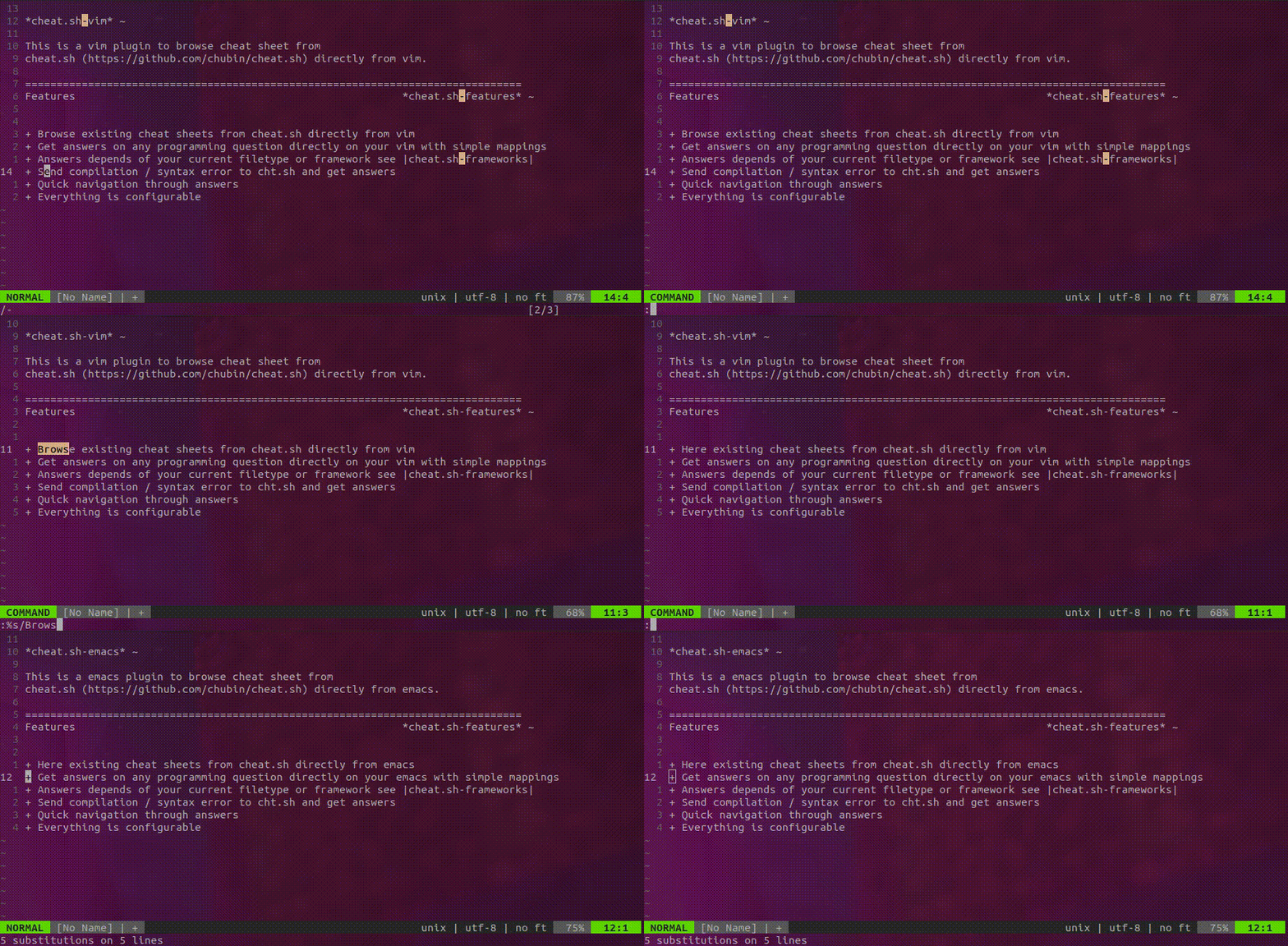
See it in Action ¶ #
The Video that inspired this ¶ #
Check out Josh Branchaud’s great series on the Vim-Unalphabet.