External Link uxplanet.org A nice set of blacks to use in web design. Subtle variants off of black or white like this can really make your design look nice and modern.
Posts tagged: dev
All posts with the tag "dev"
310 posts
latest post 2026-08-13
Publishing rhythm
Wes Bos (@wesbos) on X Are you using position: absolute; to overlap elements? It's almost always better to Use CSS Grid instead! X (formerly Twitter) · x.com This is a pretty incredible use of css grid to overlay items overtop of each other without needing to resort to and the side effects that it brings.
A slug is the part of the url that comes after the domain. Commonly matches the file name of a markdown file many blogging systems. These are typically human readable, unique identifiers for pages within the site.
Wikilinks are a core concept within obsidian to link to documents by Slug wrapped in double square brackets. These are commonly used within wiki site generators.
[[slug]]
Obsidian gives you a keybinding alt+enter to go to that file, but if it does not exist it will create the file for you in the root of the project. It’s a nice way to quickly make new documents.
Hotkey to open link under at the text cursor position while typing in edit mode I find myself not wanting to leave the keyboard for navigation and think a keyboard-only shortcut that could open a link at the text cursor position is at would be really handy for this case. Obsidian Forum · forum.obsidian.md Obsidian has a go to definition like feature, the keybind is alt+enter, I would have never guessed this one.
It was not obvious to me, but if you have a wikilink such as Trying Obsidian, you can jump to the file in obsidian, just like you can with lsp go to definition, the keybinding is alt + enter.
I’ve long used copier to create all of my posts for my blog, and it works really well for my workflow. I think of a title, call a template, and give it a title. out of the box obsidian did not seem to work this way. It seems like it wants me to right click a file tree and make a new file using the tree, this is not my jam.
Here is what I came up with to replace my til template.
---
date: <% tp.file.creation_date() %>
templateKey: til
title: <%*
  const originalFileName = await tp.system.prompt("Enter file name");
  const toTitleCase = str => str.replace(
    /\w\S*/g,
    txt => txt.charAt(0).toUpperCase() + txt.substr(1).toLowerCase()
  );
  const title = toTitleCase(originalFileName);
  tR += title + '\n'; // Add the title to the template result
-%>
published: true
tags:
  -
---
<%*
const fileName = originalFileName.toLowerCase().replace(/\s+/g, '-');
const newFilePath = `pages/til/${fileName}`;
await tp.file.move(newFilePath);
-%>

<% tp.file.cursor() %>
tRis a return value, and it gets placed directly into the place it is in the fileto.file.cursor()creates a tab-index point so I can tab into the content
I’m giving obsidian a go as an editor for my blog and one of the main things I want to fix in my workflow is the ability to quickly drop in images. on first look through the community plugins I found Image Converter. I set it up to convert to webp and drop them in a git submodule. I may make it something other than a git repo in the future, but I’ve learned that adding images to my blog repo quickly makes it heavy and hard to clone on other machines.
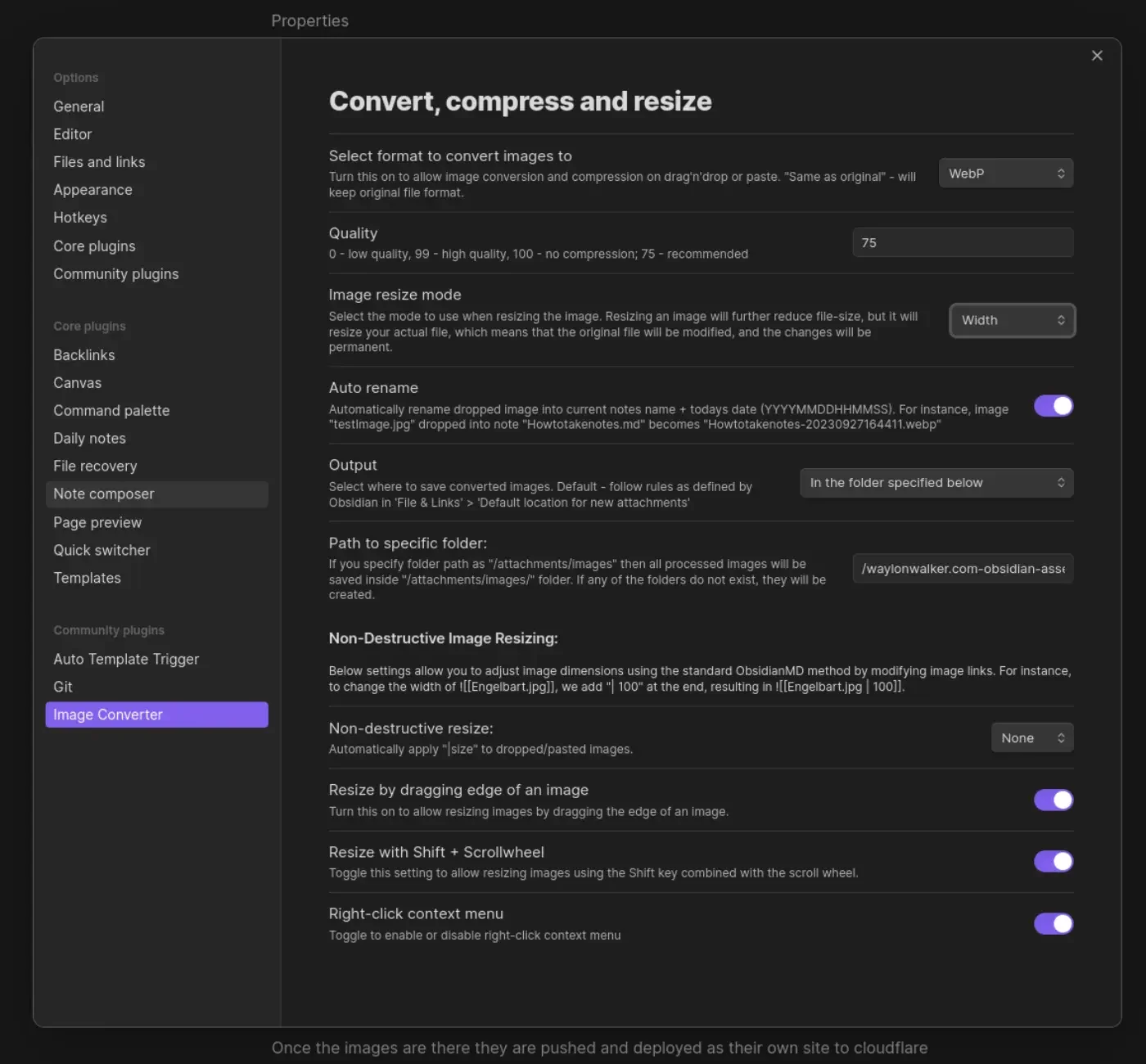
Once the images are there they are pushed and deployed as their own site to
cloudflare pages. I made a quick edit to my sick wikilink hover plugin for
my blog. if it sees a wikilink ending in webp, convert the domain over to
obsidian-assets.waylonwalker.com, and clean up the remaining "! " that the
python md-it library leaves behind.
Note
after first try I needed to increase the width from 600 to 1400, the image in this post was unreadable.
This is part of me getting set up and Trying Obsidian


External Link stackoverflow.com today I learned that there is an accessibility feature in chrome that allows you to place a text cursor anywhere on the page. I had accidentally done this and it drove me mad that it was there.
Command Line Interface Guidelines An open-source guide to help you write better command-line programs, taking traditional UNIX principles and updating them for the modern day. clig.dev This is a pretty sick set of guidelines to help you write better cli programs, I’m definitely coming back to reading this one more in depth later.
External Link fullystacked.net You can explicitly make a script render blocking, nothing will be rendered until this js is ready.
FastHX - FastHX volfpeter.github.io Very interesting approach to htmx and fast api. It uses separate decorators for returning template partials and json that can be stacked to include both options on a single route. The templates are explicitly set in the decorator. Separate decorators are used for full page and partial pages. I don’t see an example of full and partial pages being combined. I think the demo app must be behaving in a spa like fashion where it does not get all of the data when it calls index and index will ask for user-list. Definitely going to keep my eye on this project and ponder on it.
FastHX - FastHX volfpeter.github.io Very interesting approach to htmx and fast api. It uses separate decorators for returning template partials and json that can be stacked to include both options on a single route. The templates are explicitly set in the decorator. Separate decorators are used for full page and partial pages. I don’t see an example of full and partial pages being combined. I think the demo app must be behaving in a spa like fashion where it does not get all of the data when it calls index and index will ask for user-list. Definitely going to keep my eye on this project and ponder on it.
Background Tasks - FastAPI FastAPI framework, high performance, easy to learn, fast to code, ready for production fastapi.tiangolo.com fastapi comes with a concept of background tasks which are functions that can be ran in the background after a function has been ran. This is handy for longer running functions that may take some time and you want to have fast response times. Here is an example from the docs
Damn, supply chain vector attacks are wild. Random guy in Primes stream was getting $40k offers to buy their open source project while in university and they have never made anything from it. What a social engineering attack this is. It would be so easy to make it look like a good deal and that the package was going to a good new owner who has real resources to maintain it.
Supply chain attacks are so big these days engineers definitely need to take these into consideration. It’s wild that such a simple attack vector hit some really big applications. This particular vector is so easy to avoid. You are already hosting web content, just curl the file and self host the script, then you own it. That eliminates this attack vector all together, but doesn’t completely remove supply chain attacks, the js file can still hit external apis internally. What I see has happened in this case is that the owner of the domain polyfill.io changed. so anyone who directly linked to them got a malware injected script used. I can only imagine the number of applicatons that are not even being maintained anymore getting hit by this. TLDR, if you are taking something to production, where you are goind to deploy it and let it run, host the js yourself. these cdns are great for prototyping, but tread with caution.
Two inspirational people in one podcast, its cool to see how adam thinks about code, css, webdev, and building businesses.
I’ve added htmx to my blog
I’ve added htmx to my blog. It’s extra bloatware that I long avoided, but it’s so damn convenient. Ok so it’s not bloatware, but it’s not the theme I was going for. I wanted my site to be as lightweight as possible. I had at one point gone too far and had Mb’s of react that did not provide any value for the end user. can it be done with jinja {% with feed = markata.feeds.recent_thoughts %} {% include 'feed_sm_partial. html ' %} {% endwith %} Feed Partials markata pre-release 0.8.1.dev10 has been released with support for feed partials on pypi. It’s now part of my blog Commit aa233 added support for recent posts on each page to be loaded off of this partial.
Calendar data could not load. Try again.