Realign I just popped out a realign of the ol’ personal website. I only say realign as I didn’t rethink every single detail of the thing. I’d say probably 40% of the original HTML and CSS… Chris Coyier · chriscoyier.net Chris Coyier had a small re-align on his site, some good nuggets in here. I like the idea of having a photo of myself prominently on the site, so you know who you’re dealing with here. I really like this after thinking about it and I think I am going to make sure I get my face back on my posts. I do have my 8bit style pixel art image of me that I use on social media, but no real picture. I feel like a lot of people redesign their entire website when it’s time to update to the latest list of social networks and I’m no different. Once you touch it you gotta keep going. I can totally relate to this, once you open the thing, you get the build tools greased up, and your confidence high that re-deploying isn’t going to mess something up, I tend to start digging in to other things.
Posts tagged: blog
All posts with the tag "blog"
79 posts
latest post 2026-08-08
Publishing rhythm
Changelog Maker of web things, sticker merchant, viral toot-based business man, blogger, podcaster, and pizzaiolo. Human dad. rknight.me Well done changelog with some really good inspirational nuggets. Many slash pages I want to check out and an 11ty contribution graph.
slash pages A guide to common pages you can add to your website slashpages.net A nice list of slashpages you might want to consider including / aliasing / 301ing. These feel like nice things to setup and keep in the back pocket for obsidian style wiki link to easily. I get kinda bad at wiki-linking as much as I would like to, mostly because it does require some amount of work to make the page, and keep it up to date over time, then remember that you even have it. Some are serious, some very common, some quite useful.
/colophon
Colophon a page that describes how the site is made, with what tools, supporting what technologies Author # All posts on this site are written by Waylon Walker, the typical content has changed and evolved over time. I go back and make a few corrections, but for the most part things stay pretty much as they were published originally. see more in Waylon Walker tech # This site is a static site build with my own static site generator markata, Thoughts or as Simon Willison calls it a link blog posts are pulled in as a regular posts, all is hosted on cloudflare pages. markata Thoughts cloudflare pages see more about these components in about this site Analytics # I do not track users, I respect the privacy of my readers and do not track their information. I do track analytics on my own writing a post rate. Its more of an interesting history of the site. meta # Some evergreen pages that are more about me or this site from the Posts tagged: meta feed.
My approach to running a link blog I started running a basic link blog on this domain back in November 2003—publishing links (which I called “blogmarks”) with a title, URL, short snippet of commentary and a “via” … Simon Willison’s Weblog · simonwillison.net I still cannot believe I thought I had such a unique idea with thoughts only to find out shortly thereafter that Simon beat me to the punch by about 20 years! Simon put a lot of work into this post please check it out. Its not only filled with tons of little nuggets about blogging, it has just a ton of links to other posts I’m itching to read now. https://simonwillison.net/2024/Dec/22/link-blog/#thoughts.waylonwalker.com a linkblog proves that you read # Simon mentions it in the post as well, but one thing about having a link blog does is that it proves that you actually read articles that you share. This is really more about proving to myself, and reminding myself that anyone else, it’s a good feeling. Trying to add soemthing extra # include names of people, and add tags for common people something extra - the whole point is to bring something to the post without stealing thunder, but rather linkbuilding for the author that pu…
How I use Obsidian Templater One of my favorite Obsidian plugins is Templater, which lets you create reusable templates in your notes vault! cassidoo.co I really like this idea of keeping a set up contacts in a markdown repo, and being able to wikilink them to different tickets / meetings and what not. I’m imagining the graph you can build, it feels quite interesting. Even more relevant as we see things like teams rolling out retention limits to messages. Here is Cassidy’s format, I like it but I’m probably not going to track the birthday of most people I work with, thats just not the relationship I tend to have with work friends. It might be a midwest or non tech thing, but I am not even aware if any of my co-workers have social media, and I assume that if they did it would not include anything work related but more football and other sports.
thoughts.waylonwalker.com
How to make your RSS feed pretty Life is too short for ugly XML. cassidoo.co I love me some styled rss, it’s how the OG internet was made to be. You choose what you want to read and when. There is no middleman aggregator inflating the reach of things they want you to see or suffocating things against them. It’s just you and your internet friends. Cassidy’s Styled rss # Cassidy has a quite lovely and easy to read rss feed, with an open source style sheet, that is part of her open source blog template for astro blahg, love that name by the way! Dave Rupert’s Feed # I first learned of styled rss feeds from shoptalkshow.com, specifically from Dave Rupert. Dave uses a pretty bog standard styled rss feed with pretty-feed-v3. This repo is probably the best place to start if you are looking to style your rss feed. https://github.com/genmon/aboutfeeds/blob/main/tools/pretty-feed-v3.xsl My RSS Feed # My feed comes from my static site generator markata, a plugins all the way down static site generator written in python, made for customizing, lacking just about any and all docs so you are on your own.
Dropper Dropper is a simple file sharing service. Dropper · dropper.waylonwalker.com Dropper is a place for me to drop files for quick posts like this.
External Link cdn.statically.io Staically makes creating OG images so easy, you can just pop this in your section with some og tags.
blogging in 2024
Over the past years couple of years blog traffic has been tanking, for some time I thought it might have just been me, but then i heard it from Dave Rupert on Shop Talk show, and it made sense. LLMs and AI is slowly killing the internet as we know it. My metrics # I dug into my emails from the google search console team and found two results nearly one year apart. Impressions are only 60% of its value a year ago while clicks are only 35% of where they were a year ago. I’m getting less impressions and even less clicks. Suspicions # What I think is happening is a large portion of users are getting their answers from ChatGPT, Copilot, and llms like this. A lot of my posts have been filling gaps in the internet, notes for myself when I struggle to integrate x in y because there was a gap of how to do so in the docs and stack overflow. Some small fraction of users have moved on to duck duck go and other non global warming search engines with AI in their results. Clicks are down even further…
Trying Obsidian
I am giving obsidian a try, this is a test post to learn the flow. Something that has been really hard for me for a long time is images, I don’t include a lot of images just because it takes so much longer just to get the post out. I store them in a separate repo, I need to resize and compress them for the web so they aren’t so big. Images are easy # This is my current wallpaper. I have more about my process in this post about Obsidian Image Converter. It’s still just markdown # I don’t know why it took me so long to understand this but obsidian is just markdown files. I pretty much just plugged in my existing blog and it picked up all the tags and was ready to run. I now get some nice visualizations to help me identify posts that were not ever tagged or maybe left unfinished. It leans hard on wikilinks # I just finished moving my backend over to md-it-python, which comes with some good wiliklink support. I even make a sick wikilink hover feature that previews wikilinks on hover. Insid…
I’m giving obsidian a go as an editor for my blog and one of the main things I want to fix in my workflow is the ability to quickly drop in images. on first look through the community plugins I found Image Converter. I set it up to convert to webp and drop them in a git submodule. I may make it something other than a git repo in the future, but I’ve learned that adding images to my blog repo quickly makes it heavy and hard to clone on other machines.
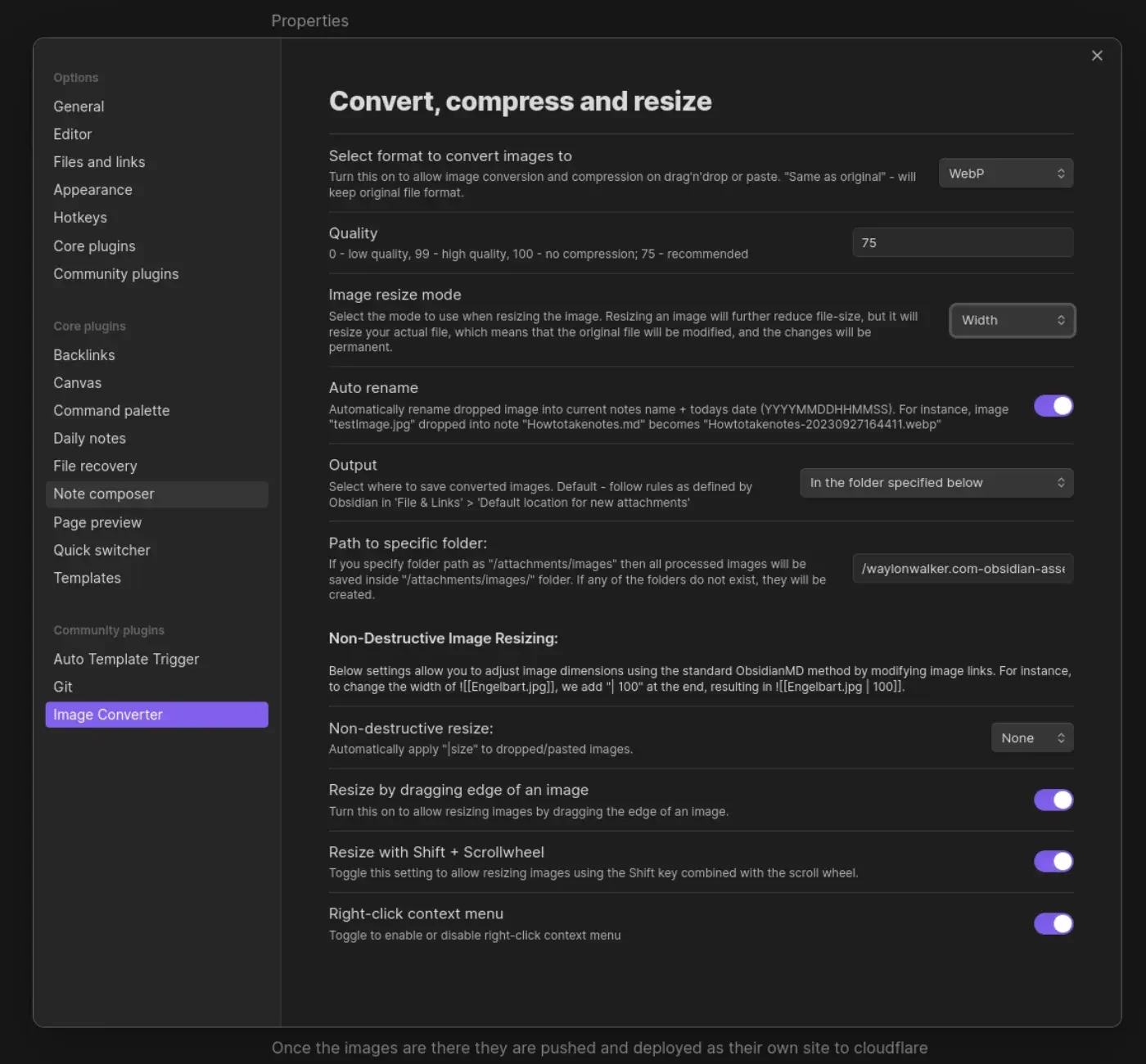
Once the images are there they are pushed and deployed as their own site to
cloudflare pages. I made a quick edit to my sick wikilink hover plugin for
my blog. if it sees a wikilink ending in webp, convert the domain over to
obsidian-assets.waylonwalker.com, and clean up the remaining "! " that the
python md-it library leaves behind.
Note
after first try I needed to increase the width from 600 to 1400, the image in this post was unreadable.
This is part of me getting set up and Trying Obsidian
thoughts.waylonwalker.com
Niklas Luhmann created the Zettelkasten method of notetaking, He was the Da Vinci of writing, holding a high standard that we can take inspiration from even today in this digital era. As many times as I have seem the Zettelkasten covered, I never knew that it roughly translated to little cards in a box. Four Principles # Mischa lays out four principles of Zettelkasten. Atomic - each card conains one idea Link - cards are linked together Structure - comes from the links Own Words - You write the note in your own words My blog, tils, and thoughts make up my own zettelkasten. I am not going to say that mine is a perfect representation of his method, but the components are here. rather than building books, my thoughts and tils build up to blog posts. The rate of blog posts I write definitely changes with the seasons of life, as seasons change it becomes a bigger or smaller part of the season. I really like Mischa’s most important note to Write in your own words, this is what really promotes learning, and proves to yourself that you can form a thought around the topic. Up until recently I’ve wrote everything, but lately I’ve taken to copy pasting some quotes into my thoughts posts, but…
Email Address Obfuscation Hide email addresses from bots while keeping them visible to visitors. Cloudflare Docs · developers.cloudflare.com I recently started seeing email-decode.min.js show up on my blog posts, and I wondered what the heck? I didn’t put it there. Turns out that cloudflare put it there from pages to safely serve email addresses for me. inspecting the page without js running we can see that the mailto email is swapped out for email protected. Neat feature. Looking deeper into this article it looks like this feature comes from Scrape Shield and enabling Email Address Obfuscation.
Welcome to RSS Club Congratulations on joining a secret society! If you’re reading this, that means my message has been transmitted successfully. This post is only available to you, Reader, through the ancient peer-... daverupert.com · daverupert.com Super cool idea, kinda breaking the rules by talking about it here, but Its a cool idea to throw out posts to the core audience. Apparently its been around for quite while Dave started in 2018.
Blogmarks that use markdown I needed to attach a correction to an older blogmark (my 20-year old name for short-form links with commentary on my blog) today - but the commentary field has always … Simon Willison’s Weblog · simonwillison.net Oh I kinda like the name blogmark, as opposed to thoughts like I have chose for the same thing. Aparantly Simon beat me to the punch by 20 years on this one.
A Link Blog in the Year 2024 Kellan Elliott-McCrea has started a new link blog: Like many people I’ve been dealing with the collapses of the various systems I relied on for information over the previous decades. … Simon Willison’s Weblog · simonwillison.net THIS! is the same reasons that I built thoughts {.hoverlink}. Simon has bee a big inspiration along the way. He defintely changed the format of my posts as I watched him build out his quote posts. Link blogging is a pleasantly low-pressure way of writing online. Found something interesting? Post a link to it, with a sentence or two about why it’s worth checking out. Ditto! just make a post.
Kellan brings some interesting thoughts on where the internet is headed in 2024. Interestingly I see myself headed in a similar direction. Feeling like I know just enough to say fuck it and build my own platform for me to me me, from thoughts {.hoverlink} where I link and make thoughts on posts like this, to reader {.hoverlink} which is my rss reader replacement that I wanted in 2013 when it was killedbygoogle And particular with the collapse of the social spaces many of us grew up with, I feel called back to earlier forms of the Internet, like blogs, and in particular, starting a link blog. Ai has really had quite the two sided effect since chatgpt launched and set the world ablaze. Suddenly you can get any answer you want as a custom fit blog post for free without effort, thus killing the traffic to any of these sites.