
From the same Author that brought us command line essentials like fd and
bat written in rust comes pastel an
incredible command-line tool to generate, analyze, convert and manipulate
colors.
Install ¶ #
You can install from one of the releases, follow the instructions for your system from the repo. I chose to go the nix route. I have enjoyed the simplicity of the nix package manager being cross platform and have very up to date packages in it.
nix-env --install pastel
Mixing colors ¶ #
Something I often do to blend colors together is add a little alpha to something over top of a background. I can simulate this by mixing colors.
pastel color cornflowerblue | pastel mix goldenrod -f .1
Here is one from the docs that show how you can generate a color palette from random colors, mix in some red, lighten and format all in one pipe.
pastel random | pastel mix red | pastel lighten 0.2 | pastel format hex
color picker ¶ #
I am on Ubuntu 20.10 as I write this and it works flawlessly. When I call the command, a color picker gui pops up along with an rgb panel. I can pick from the panel or from anywhere on my screen.
pastel color-picker
Conversions ¶ #
I often will want to convert a color from rgb to hex or hsl vice versa. I open google and search. This is one part that I could really use adding to my workflow.
Check it ¶ #
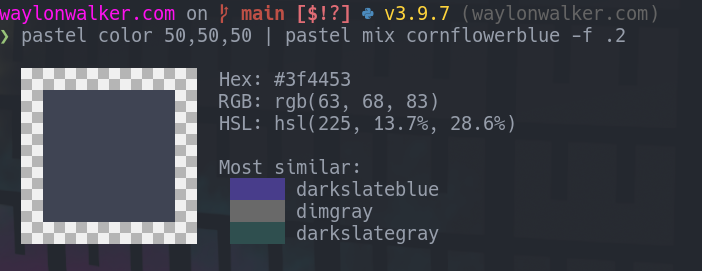
Here I can mix up a dark grey with rgb, mix in 20% cornflowerblue, and grab the hex value.
pastel color 50,50,50 | pastel mix cornflowerblue -f .2
I really want to get this into my workflow. I saw it quite awhile ago but have not done much color work. Lately I have been doing a bit more front end, and have been getting into game development. This is the time to stop googling random color mixers and use this one.